Math skills for physics›Arithmetic and Numerical Computation (M0)

Arithmetic and Numerical Computation (M0)

Improve physics and maths with units, standard form, estimates, and calculator skills for logs, exponentials, and trigonometry in context.
29 min

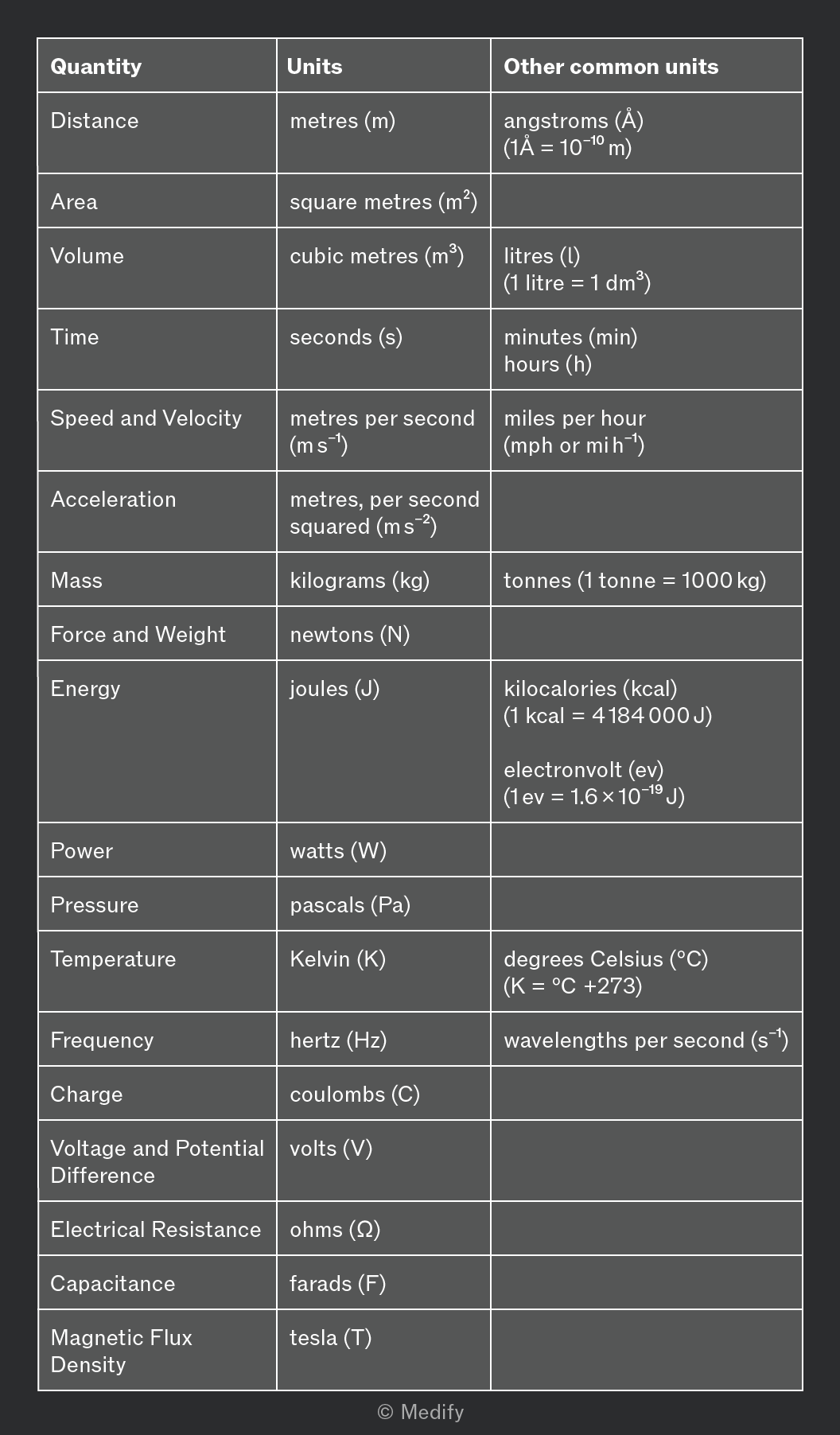
You are expected to be familiar with the units used for various quantities in A-level Physics.

Ensure that you are familiar with all the following quantities:
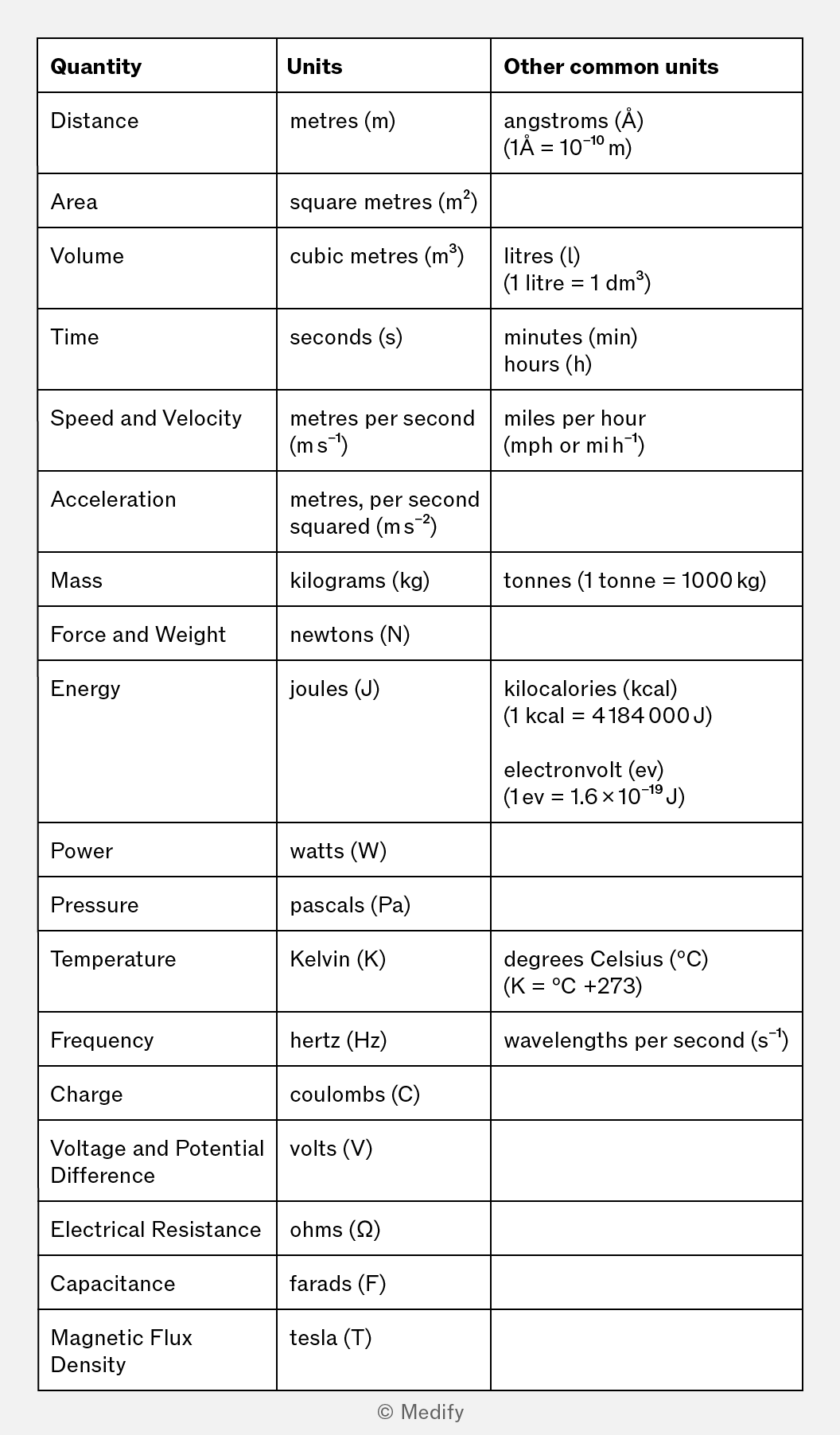
The image is a table listing quantities, units, and other common units. The columns are labeled 'Quantity', 'Units', and 'Other common units'. The entries are: Distance - metres (m), angstroms (Å) (1Å = 10^-10 m); Area - square metres (m²); Volume - cubic metres (m³), litres (l) (1 litre = 1 dm³); Time - seconds (s), minutes (min), hours (h); Speed and Velocity - metres per second (m s⁻¹), miles per hour (mph or mi h⁻¹); Acceleration - metres, per second squared (m s⁻²); Mass - kilograms (kg), tonnes (1 tonne = 1000 kg); Force and Weight - newtons (N); Energy - joules (J), kilocalories (kcal) (1 kcal = 4184 J), electronvolt (ev) (1 ev = 1.6 × 10⁻¹⁹ J); Power - watts (W); Pressure - pascals (Pa); Temperature - Kelvin (K), degrees Celsius (°C) (K = °C +273); Frequency - hertz (Hz), wavelengths per second (s⁻¹); Charge - coulombs (C); Voltage and Potential Difference - volts (V); Electrical Resistance - ohms (Ω); Capacitance - farads (F); Magnetic Flux Density - tesla (T). At the bottom right corner, there is a copyright notice © Medify.

You may also see some of these units combined with prefixes to handle very large and very small numbers.

For example, the milligram (mg) is a unit for very small masses;

These units may be combined into more complex units.

For example, specific heat capacity might be measured in joules per kilogram per Kelvin

Add to favourites

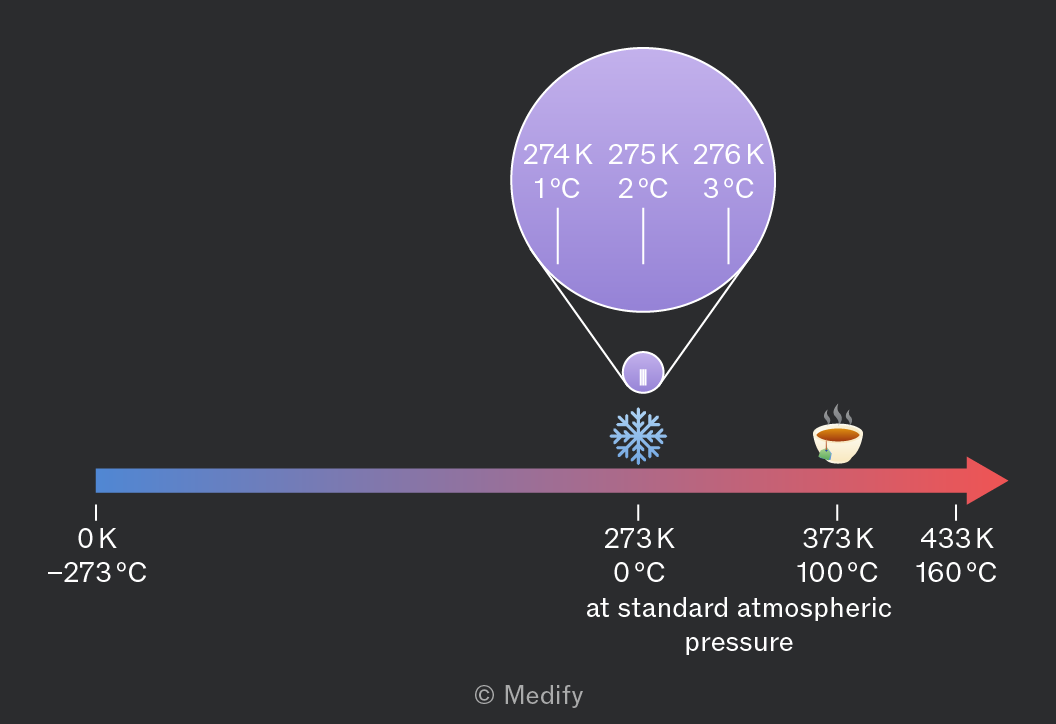
Temperature can be measured in several different units. In Science, the two important units of temperature are:

  • degrees Celsius where water freezes at and boils at
  • Kelvin where is the minimum possible temperature, known as absolute zero, and an increase of is equal to an increase of

Since absolute zero is at approximately

Temperature in Kelvin = temperature in degrees Celsius + 273
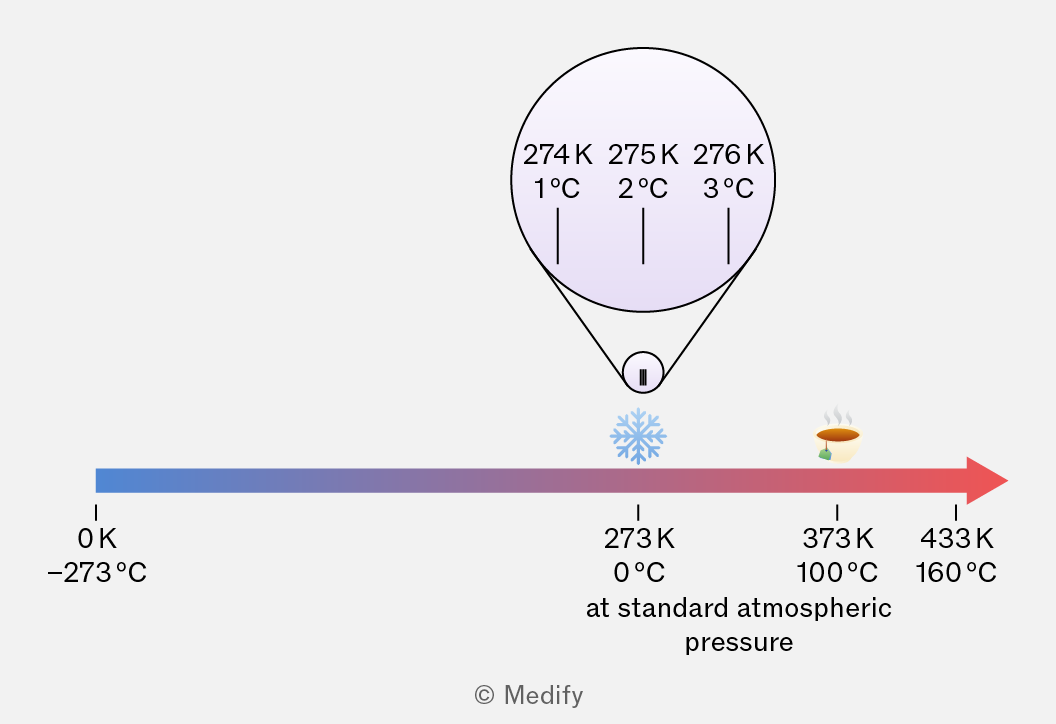
A horizontal temperature scale with a gradient from blue to red. The left end is labeled '0 K -273°C', the middle is labeled '273 K 0°C at standard atmospheric pressure' with a snowflake icon, and the right end is labeled '373 K 100°C' with a steaming cup icon and '433 K 160°C'. Above the scale, a magnified section shows '274 K 1°C', '275 K 2°C', and '276 K 3°C' with vertical lines pointing downwards.

Degrees Celsius is the most common unit in everyday life and in Biology.

Kelvin is more commonly used in Physics, particularly in formulas where a quantity is proportional to temperature.

Add to favourites

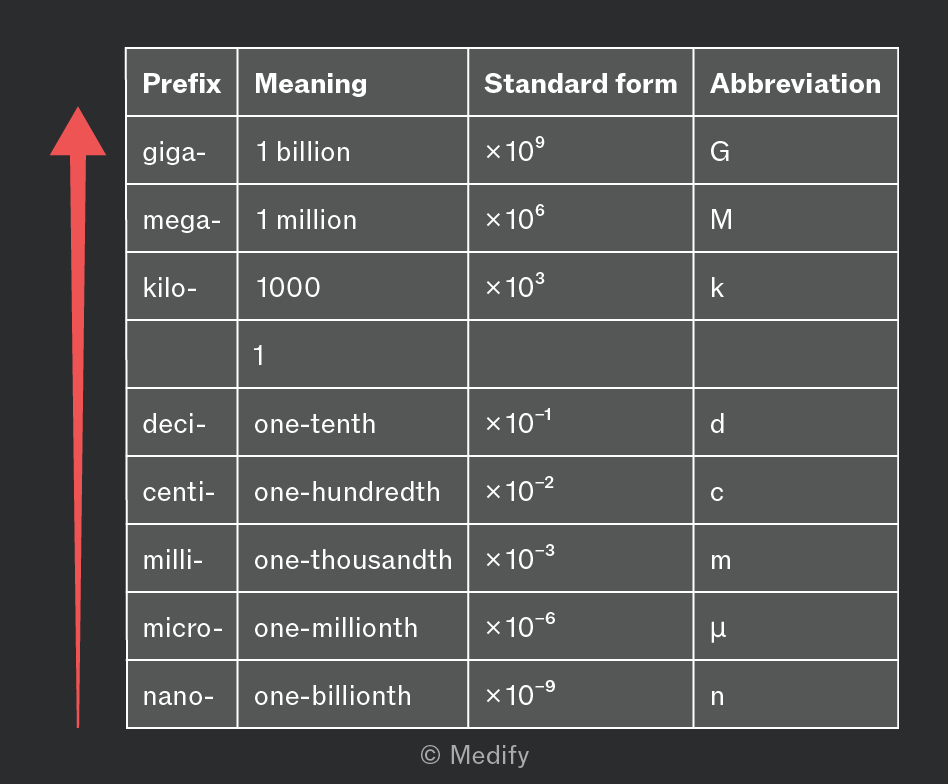
To make it easier to think about and discuss very large and very small numbers, scientists use prefixes before the units.

For example, a transistor in your phone might be metres wide. This can be written as 10 nano metres, where nano is a prefix meaning ‘one billionth’.

You need to recognise and use the following prefixes (and their abbreviations) in your exams.
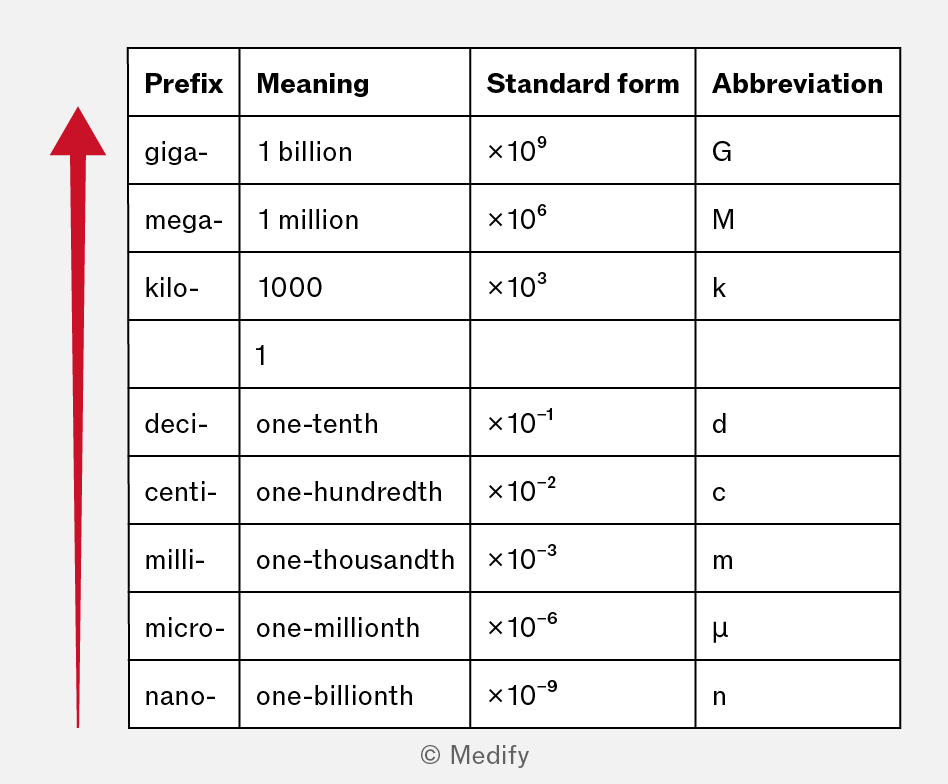
The image displays a table with four columns labeled 'Prefix', 'Meaning', 'Standard form', and 'Abbreviation'. The rows list metric prefixes as follows: 1. giga-: Meaning '1 billion', Standard form '×10^9', Abbreviation 'G'. 2. mega-: Meaning '1 million', Standard form '×10^6', Abbreviation 'M'. 3. kilo-: Meaning '1000', Standard form '×10^3', Abbreviation 'k'. 4. (empty): Meaning '1', (empty), (empty). 5. deci-: Meaning 'one-tenth', Standard form '×10^-1', Abbreviation 'd'. 6. centi-: Meaning 'one-hundredth', Standard form '×10^-2', Abbreviation 'c'. 7. milli-: Meaning 'one-thousandth', Standard form '×10^-3', Abbreviation 'm'. 8. micro-: Meaning 'one-millionth', Standard form '×10^-6', Abbreviation 'μ'. 9. nano-: Meaning 'one-billionth', Standard form '×10^-9', Abbreviation 'n'. There is a large red arrow pointing upwards on the left side of the table.

For example:

  • Four million joules is four megajoules, written
  • One millionth of a gram is a microgram, written
  • 0.05 seconds can be expressed in milliseconds as
Add to favourites

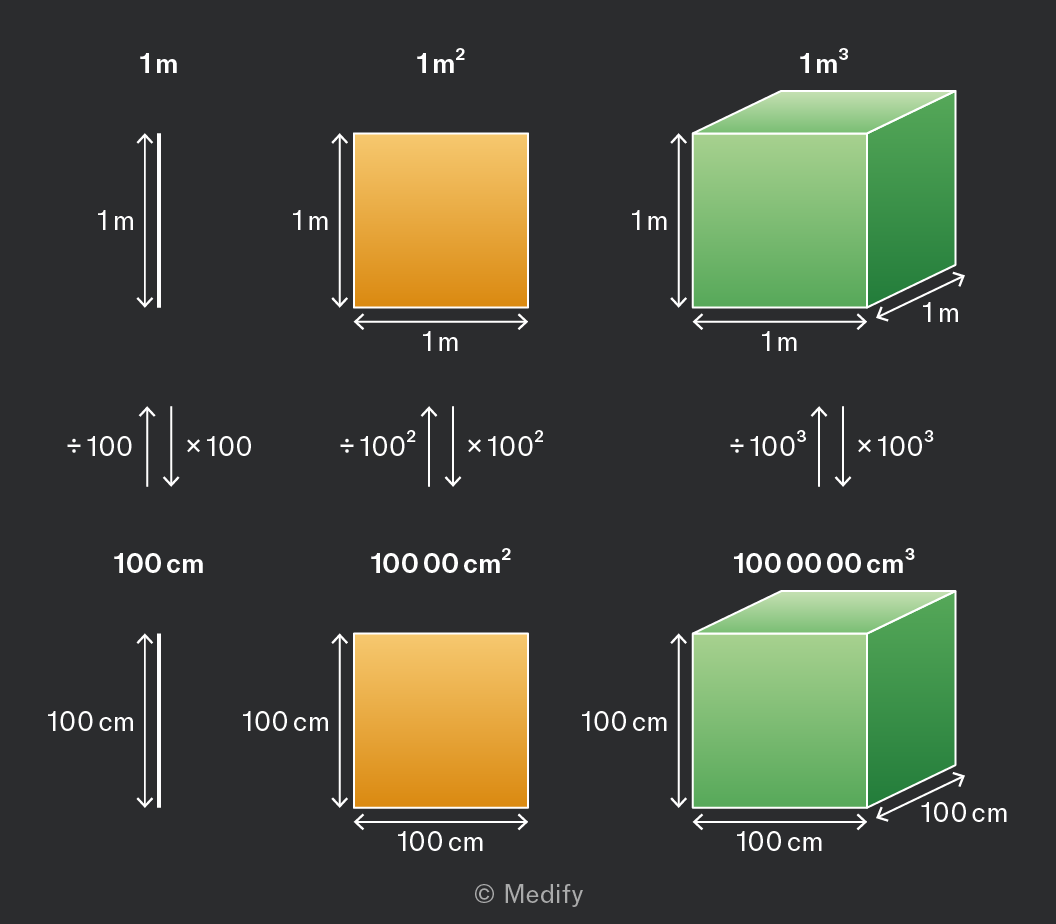
When converting between units of length, you need to multiply or divide by a power of ten.
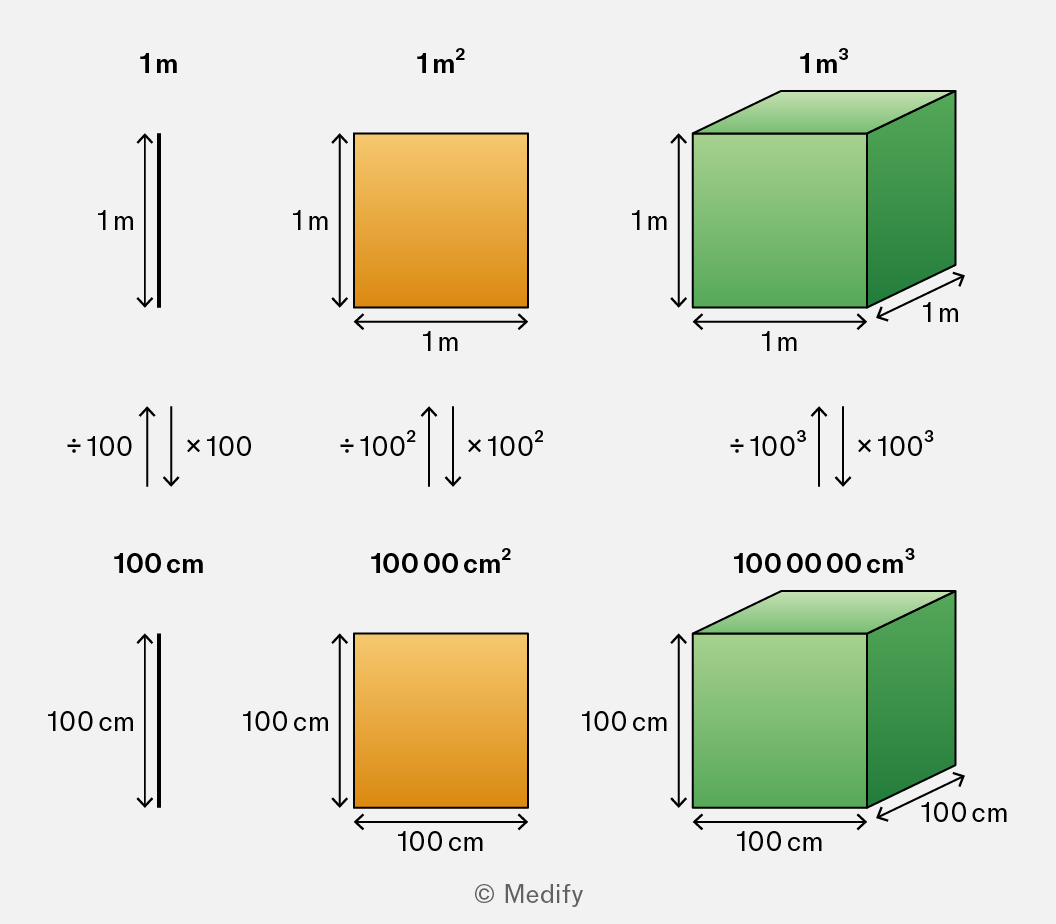
The image shows a comparison between metric units and their conversions. The top row displays a 1-meter line with dimensions labeled as '1 m', a square with dimensions labeled as '1 m²', and a cube with dimensions labeled as '1 m³'. Each has arrows indicating length, width, and height all labeled as '1 m'. Below these, conversion arrows point downwards, labeled '÷ 100', '÷ 100²', and '÷ 100³', respectively, leading to the bottom row. The bottom row shows a 100-centimeter line labeled as '100 cm', a square labeled as '10,000 cm²', and a cube labeled as '1,000,000 cm³'. Each has arrows indicating length, width, and height all labeled as '100 cm'. Arrows pointing upwards between the top and bottom rows indicate multiplication by '× 100', '× 100²', and '× 100³'.

For example:

For the related conversion between units of area, you need to apply this conversion twice, because area is a two-dimensional quantity.

For the related conversion between units of volume, you need to apply this conversion three times, because volume is a three-dimensional quantity.

Add to favourites

Question walkthrough

Convert between units of area and units of volume.

Converts a land area from km² to m² and to cm² in standard form, then converts a volume from mL to m³, deriving the correct power-of-ten conversion factor for area and volume units.

One litre is a volume equal to a cube with sides of This is a cubic decimetre, written It is also equal to

There are 1000 litres in

The standard prefixes can be used for litres. For example, a raindrop might be which could be written
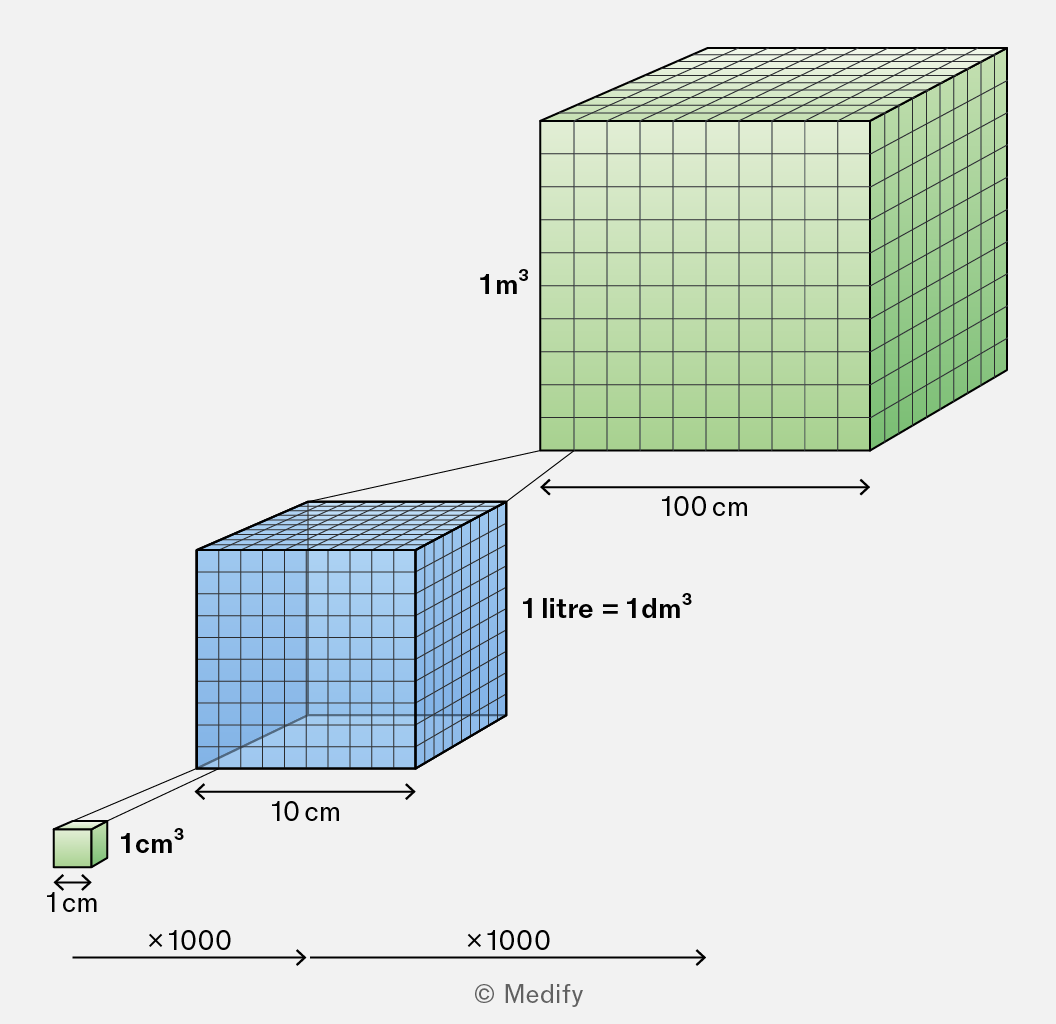
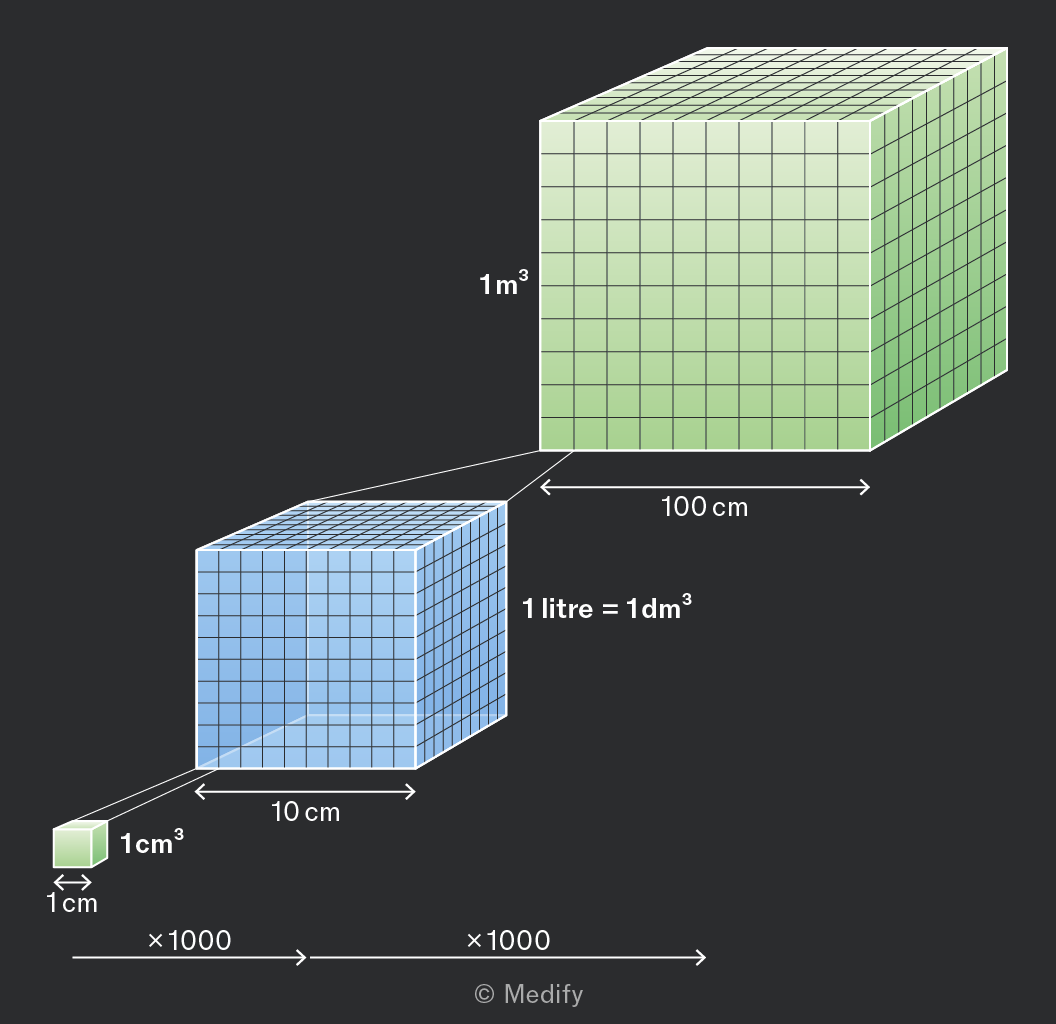
The image shows a visual representation of volume measurements in cubic meters, liters, and cubic centimeters. Three cubes are depicted: a small green cube labeled '1 cm³' with dimensions '1 cm x 1 cm x 1 cm', a medium blue cube labeled '1 litre = 1 dm³' with dimensions '10 cm x 10 cm x 10 cm', and a large green cube labeled '1 m³' with dimensions '100 cm x 100 cm x 100 cm'. Arrows with labels 'x 1000' connect each cube, demonstrating the scaling factor between them. The medium cube is 1000 times larger than the small cube, and the large cube is 1000 times larger than the medium cube.
Add to favourites

When converting between units, remember that the actual quantity remains the same, but its numerical value changes.

When converting from a larger unit to a smaller unit, the numerical value increases (and vice versa).
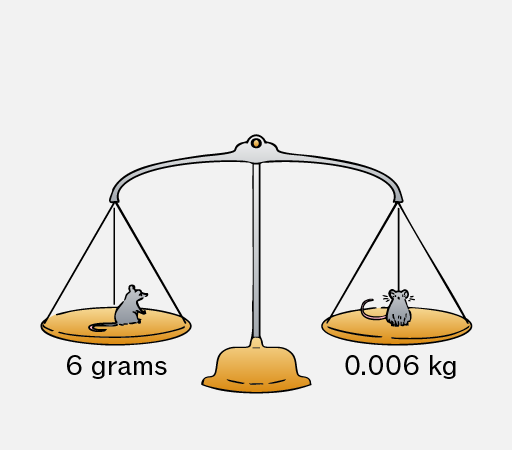
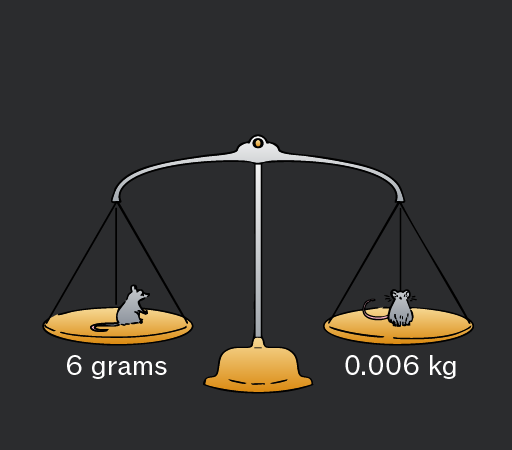
A balance scale with two pans. The left pan holds a small gray mouse with a label underneath reading '6 grams'. The right pan holds a slightly larger gray mouse with a label underneath reading '0.006 kg'.
Do

Divide by a power of ten when converting from a smaller unit to a larger unit (and vice versa), because you must have less of the larger unit.

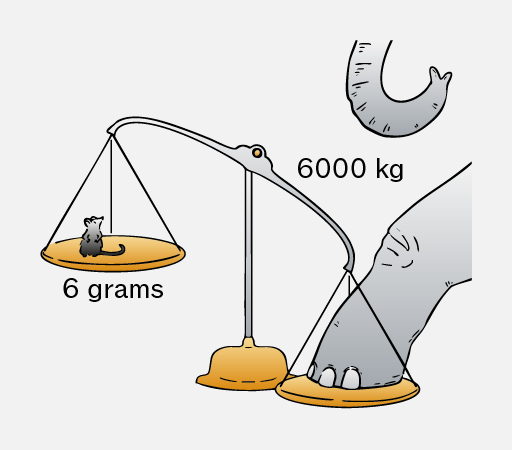
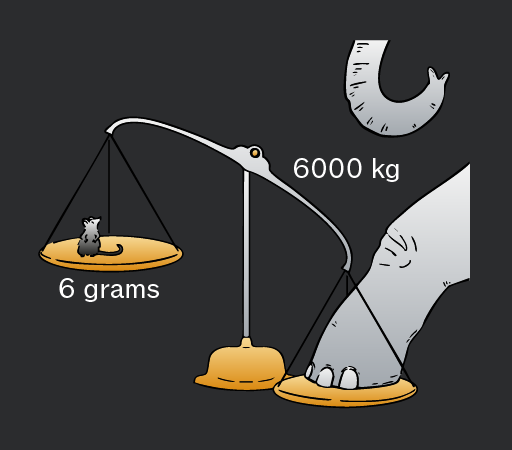
Image of a balance scale with two pans. On the left pan, there is a small mouse labeled '6 grams.' On the right pan, there is an elephant's foot labeled '6000 kg.' Above the balance, an elephant's trunk is visible. The scale is tipped heavily towards the right, indicating the weight difference.
Don't

Multiply or divide the wrong way when converting between larger and smaller units.

In an exam, check whether your answer seems reasonable!

Add to favourites

Quantities in a formula must have consistent units of measurement.

For example, if one length, area, volume, speed, or other quantity uses kilometres, the other quantities must also use kilometres rather than metres or centimetres.

Consider the formula for speed (rearranged to make time the subject):

How long does it take an athlete to run 2.4 kilometres at 4 metres per second?

Illustration of a person running. The person has long hair tied in a ponytail, wearing a red long-sleeve top, gray pants, and purple sneakers. The person is depicted in a side view, with one arm bent forward and the other bent backward, one leg extended forward and the other bent backward, suggesting motion.
Do

Convert units to ensure consistency before substituting them into any formula.

,
Don't

Substitute quantities with inconsistent units into any formula.

Add to favourites

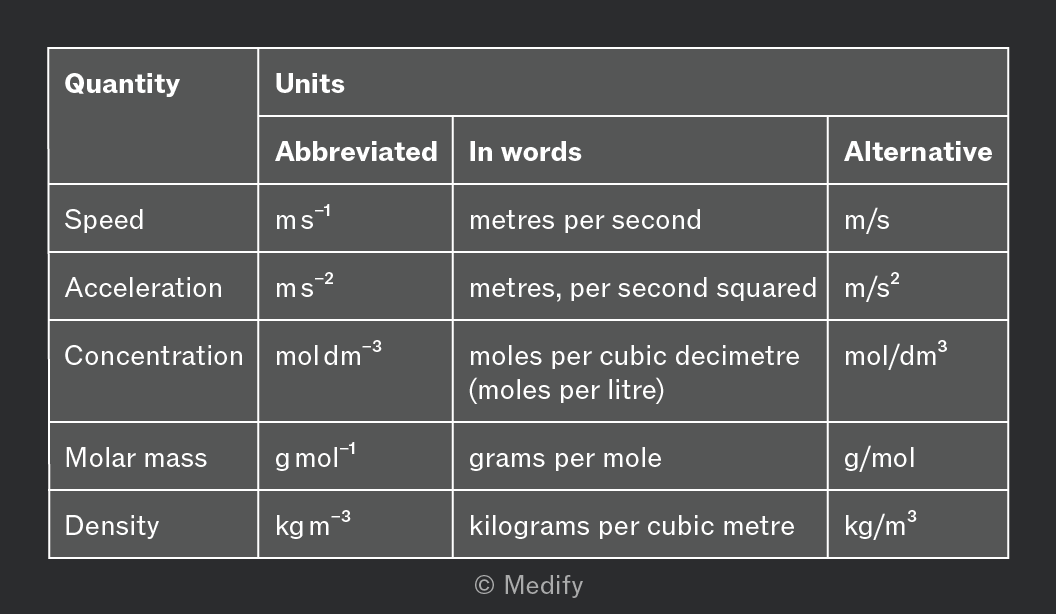
Many quantities have units with a negative exponent, such as the following:
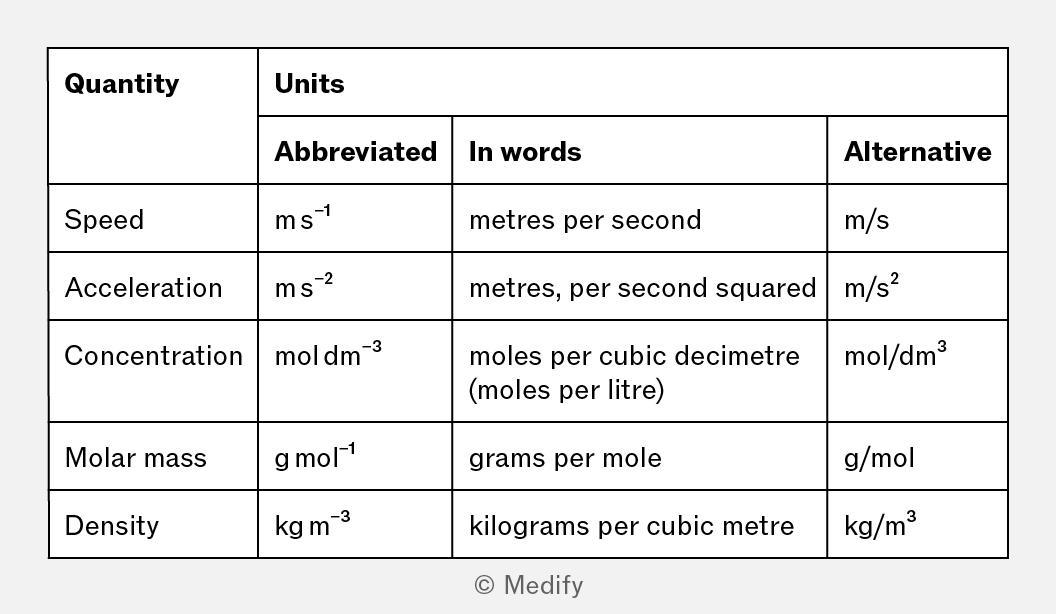
A table titled 'Quantity' with columns for 'Units' which includes 'Abbreviated', 'In words', and 'Alternative'. The rows detail different physical quantities: 1. Speed: Abbreviated as 'm s⁻¹', In words 'metres per second', Alternative 'm/s'. 2. Acceleration: Abbreviated as 'm s⁻²', In words 'metres, per second squared', Alternative 'm/s²'. 3. Concentration: Abbreviated as 'mol dm⁻³', In words 'moles per cubic decimetre (moles per litre)', Alternative 'mol/dm³'. 4. Molar mass: Abbreviated as 'g mol⁻¹', In words 'grams per mole', Alternative 'g/mol'. 5. Density: Abbreviated as 'kg m⁻³', In words 'kilograms per cubic metre', Alternative 'kg/m³'.

You can read these units as the first quantity per the second quantity, as written in the ‘In Words’ column.

It is useful to know that these units can also be written using a slash (‘/’), as written in the ‘Alternative’ column.

A rate quantifies how much something changes in a fixed time interval.
For example, the rate that people enter a stadium before a football match could be measured in people per minute, abbreviated as or as people/min.

Add to favourites

Question walkthrough

Determine the correct units for rates.

Converts a mass from tonnes to kilograms, then divides by time to find a rocket’s fuel consumption rate in kg per second, deriving the correct units along the way.

The number can be written in many ways, including:

While all of these expressions are equal to one of them is unique in that the value on the left (in bold) is between one and ten. This is known as its standard form.

A number is written in standard form as:

Where:

  • is any integer, and
  • shows the significant figures.

Any number (except zero) can be written in standard form. This is especially useful for very large and very small numbers, as it avoids writing too many zeroes.

It is important to know how to read and write numbers in standard form.

Add to favourites

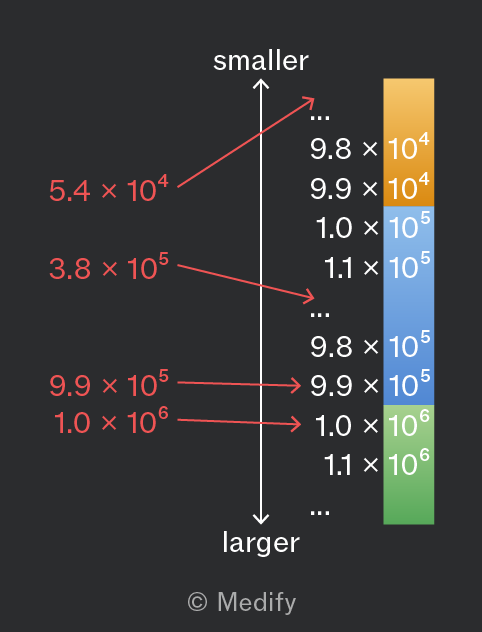
When numbers are written in their standard form, it is easy to compare their sizes:

  • The number with the larger exponent, is always the largest number
  • If two numbers have the same exponent, you can compare the significant digits in
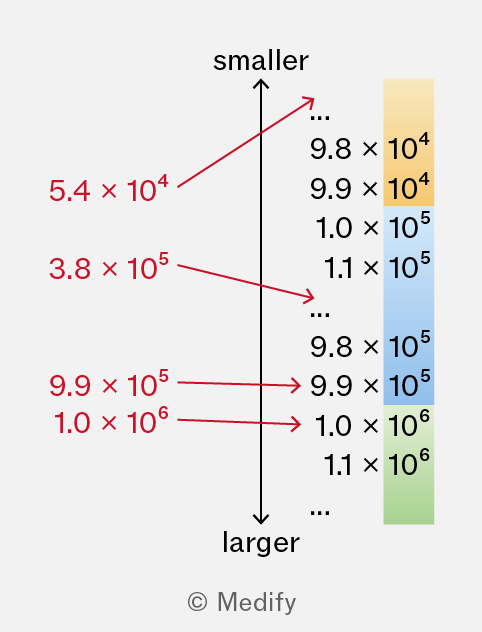
The image shows a vertical arrow with the top labeled 'smaller' and the bottom labeled 'larger.' To the right of the arrow, there is a vertical gradient bar divided into three sections: yellow, blue, and green. Each section has numbers listed next to it. From top to bottom, the yellow section has '9.8 x 10^4' and '9.9 x 10^4,' the blue section has '1.0 x 10^5' and '1.1 x 10^5,' and the green section has '9.9 x 10^5,' '1.0 x 10^6,' and '1.1 x 10^6.' Red arrows point horizontally from the main vertical arrow to the numbers, with annotations '5.4 x 10^4' pointing to the yellow section, '3.8 x 10^5' pointing to the blue section, '9.9 x 10^5,' and '1.0 x 10^6' pointing to the green section.

For example, consider the following inequality:

The number would be much smaller than all of these.

The number would be much larger than all of these.

Add to favourites

When working with standard form and multiplication, you will sometimes need the following power law:

It is useful to know that means the equation is true for all values of the variables. This particular statement is true for any values of and

To see why this is true, suppose that and means the multiplication of 3 copies of 10. means the multiplication of 4 (more) copies. This is a total of 7 copies of 10.
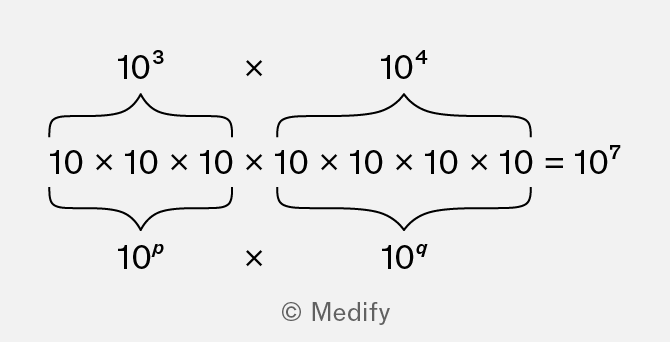
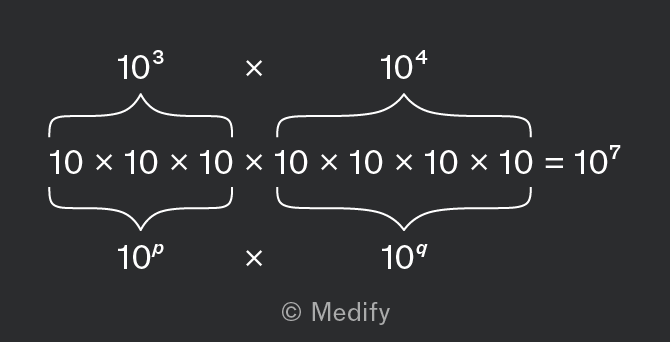
The image shows a mathematical expression demonstrating the multiplication of powers of ten. On the left, '10^3' with a curly bracket underneath showing '10 x 10 x 10' labeled as '10^p'. This is multiplied by '10^4' on the right, with a curly bracket underneath showing '10 x 10 x 10 x 10' labeled as '10^q'. The equation equals '10^7'.

This is true for any values of and

It is useful to know that this is also true when 10 is replaced by any other value, for example, with

Add to favourites

When working with standard form and division, you will sometimes need the following power law:

It is useful to know that means the equation is true for all values of the variables. This particular statement is true for any values of and

To see why this is true, suppose that and means the multiplication of 7 copies of 10. means the multiplication of 2 (more) copies. Those 2 copies cancel out 2 of the 7 original copies, leaving only 5 copies.
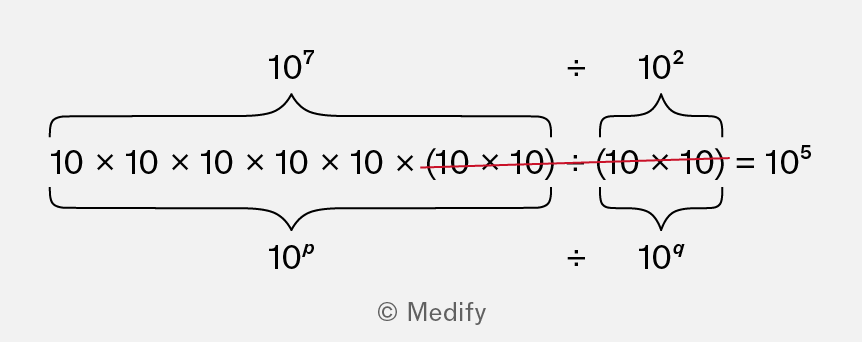
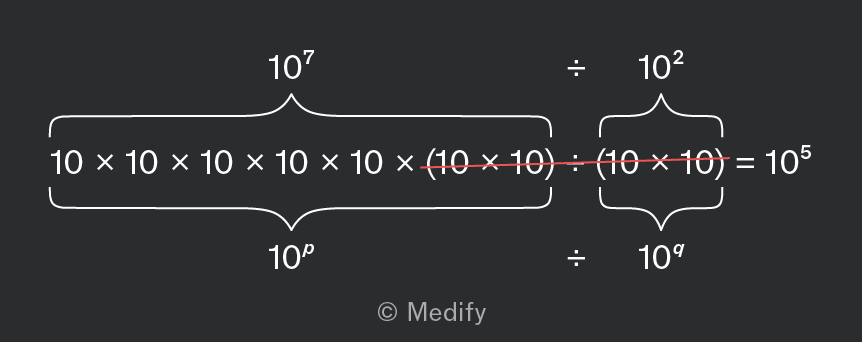
The image shows a mathematical expression involving powers of ten. It begins with 10 multiplied by itself seven times, written as 10 x 10 x 10 x 10 x 10 x 10 x 10, enclosed by a bracket labeled as 10^7. This is divided by 10 squared, written as 10 x 10, enclosed by another bracket labeled as 10^2. The expression simplifies to 10^5. The division sign and brackets indicate the process of division and simplification. The crossed-out portion, (10 x 10) ÷ (10 x 10), is highlighted in red, emphasizing cancellation.

This is true for any values of and .

It is useful to know that this is also true when 10 is replaced by any other value, for example, with :

Add to favourites

When working with standard form and exponents, you will sometimes need the following power law:

It is useful to know that means the equation is true for all values of the variables. This particular statement is true for any values of and

To see why this is true, suppose that and means the multiplication of 4 copies of 10. Raising this expression to the power of 3 means these 4 10s are repeated a total of 3 times, for a total of 12 copies.
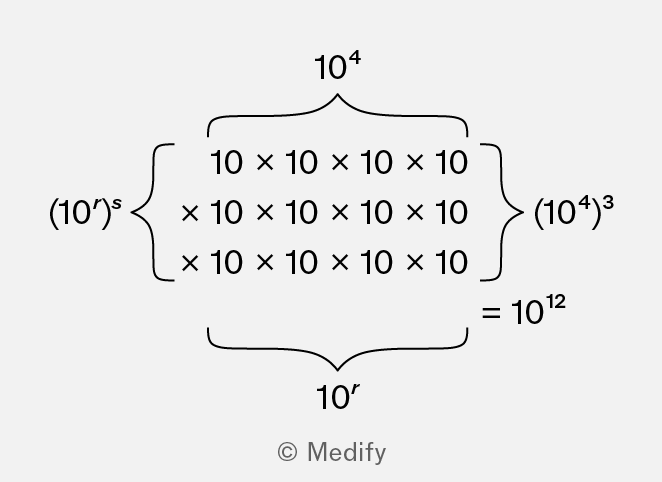
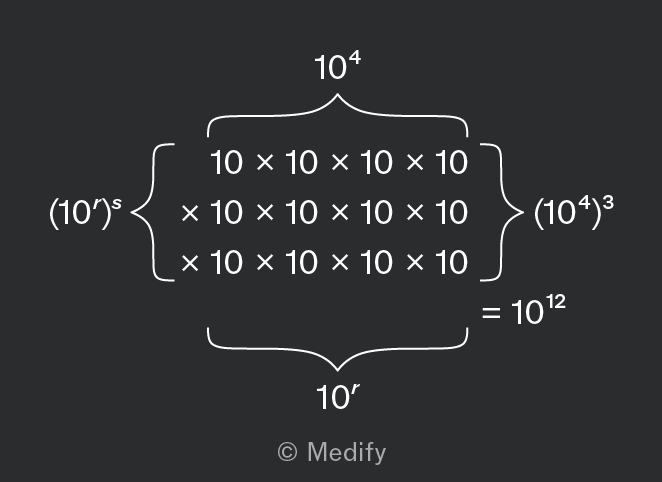
The image contains a mathematical expression demonstrating exponentiation. At the top, there is '10^4'. Below it is a large bracket encompassing the expression: '10 x 10 x 10 x 10 x 10 x 10 x 10 x 10 x 10 x 10 x 10 x 10'. On the left side of the bracket, it shows '(10^r)^s', and on the right, it shows '(10^4)^3'. At the bottom of the bracket, there is '10^r'. To the right of the bracketed expression, it equals '10^12'. The image is © Medify.

This is true for any values of and

It is useful to know that this is also true when 10 is replaced by any other value, for example with

Add to favourites

When raising a number in standard form to any power, remember that the significant digits and the power of ten must both be raised to this power:

Do

Raise both the significant digits and the power of ten to this power.

Don't

Forget to raise either the significant digits or the power of ten to this power.

Add to favourites

In your exam, you may write your answer either in standard form or as an ordinary number, unless the question requests a specific way to write the answer.

For example, the number may be written like that, or in standard form as

Do

Convert your answer to standard form, or leave it as an ordinary number (unless instructed otherwise).

Don't

Convert your answer to any non-standard form.

These numbers are both equal to but they are not in an acceptable form. This could result in a loss of marks on your exam.

Add to favourites

Question walkthrough

Perform a calculation in standard form

Squares a side length given in standard form, then adjusts the coefficient and power of ten to write the resulting area in proper standard form.

Question walkthrough

Perform a calculation in standard form II

Substitutes values in standard form into R=st/u, then converts the result into standard form by adjusting the coefficient and power of ten.

Numbers are often presented to a certain number of significant figures, especially if the number is derived from a measurement, to indicate the precision of that number.

For example, and each have three significant digits, and are more precise than which has only two.

When converting between standard form and ordinary numbers, you must retain the same precision by including the same amount of significant figures, even if the last digit is a zero.

Do

Retain the same number of significant figures when converting between ordinary numbers and standard form.

Don't

Add or remove trailing zeroes when converting between ordinary numbers and standard form.

Add to favourites

Units such as metres and grams can include prefixes to make them much larger or smaller.

For example, millimetre and kilogram.

The base SI units are these units without prefixes, with one exception: the base SI unit for mass is the kilogram (not the gram).

When writing a number in standard form, use the base SI unit. This is because standard form and prefixes are different tools for handling small and large numbers, and it is simplest if they are not mixed.

Do

Convert measurements to base SI units when writing numbers in standard form.

Don't

Use measurements that are not base SI units when writing numbers in standard form.

Add to favourites

In standard form, small numbers such as have a negative power of ten.

When dividing by such a number, the relevant power law tells you to subtract this negative number. Ensure you do this correctly, as it is a common mistake among students.

Do

Apply the power law correctly by subtracting the negative power.

The result will be a larger number:

Don't

Make mistakes when applying the power laws, especially when small numbers (with negative powers) are involved!

Add to favourites

Numbers can be rounded to a specified amount of decimal places or significant figures. Either of these specifies the precision of the number.

For example, 0.0077 is rounded to 4 decimal places, or to 2 significant figures.

Calculations with rounded numbers should be rounded to a suitable precision:

  • Round additions and subtractions to the number of decimal places of the least precise value.
  • Round multiplications and divisions to the number of significant figures of the least precise value.

An example of this is which should be rounded to 0.129 (3 d.p.) so it doesn’t have more decimal places than 0.121.

Another example of this is which should be rounded to 0.00093 (2 s.f.) so it doesn’t have more significant figures than 0.0077.

Add to favourites

Your scientific calculator may be able to convert numbers to and from standard form.

You should familiarise yourself with this functionality, so you can use it easily in your exams.

For example, on a Casio calculator, press SHIFT + SET UP and find the setting to change to Sci mode, which stands for ‘scientific notation’ and displays numbers in standard form.
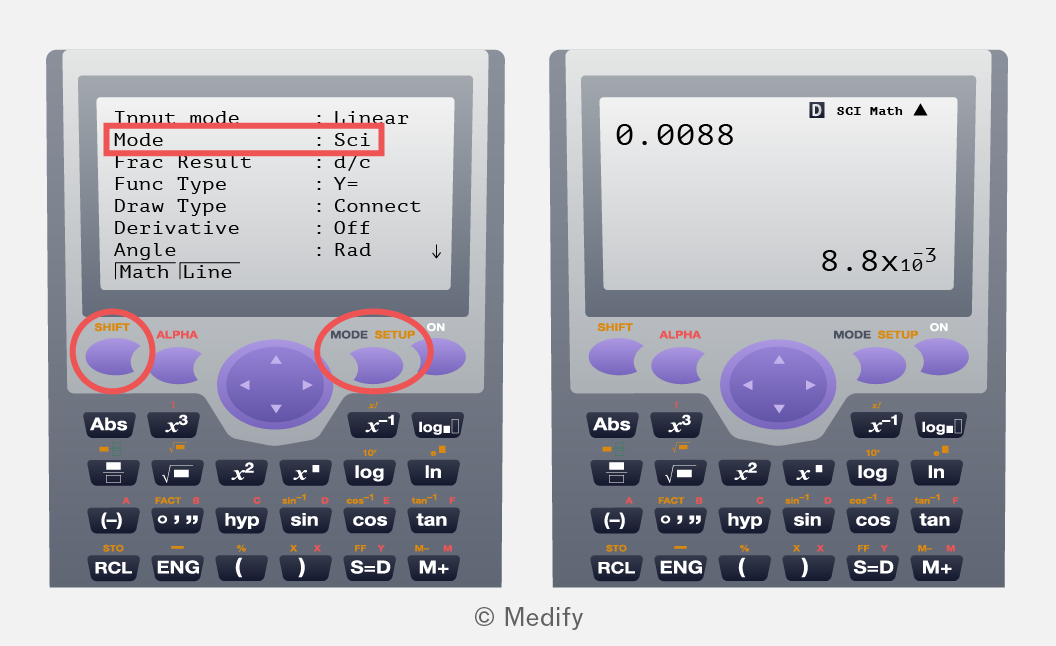
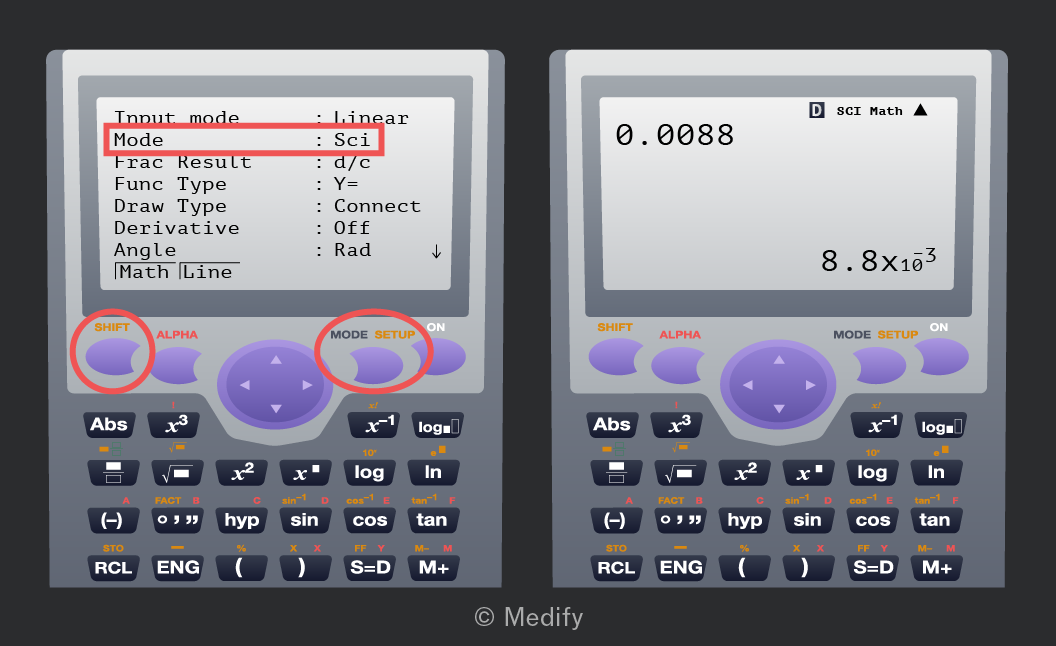
The image shows two screenshots of a scientific calculator display. The left display shows settings: 'Input mode: Linear', 'Mode: Sci', 'Frac Result: d/c', 'Func Type: Y=', 'Draw Type: Connect', 'Derivative: Off', 'Angle: Rad', and 'Math Line'. The 'Mode: Sci' is highlighted with a red box. Below the screen, calculator buttons are visible, including 'SHIFT', 'ALPHA', 'MODE', and 'SETUP'. The right display shows a calculation result: '0.0088' on top and '8.8 x 10^-3' at the bottom right. The calculator buttons below include similar labels as the left display. The 'SHIFT' and 'MODE SETUP' buttons are highlighted with red circles.

Ask your friends or teacher, or check online for instructions, if you need help checking what mode your calculator is in, or how to change modes.

Try typing 0.0088 on your calculator, and then follow the instructions to convert it to standard form. The result should be

Add to favourites

Question walkthrough

Round numbers to an appropriate amount of decimal places or significant figures.

Adds a smartphone’s mass to its packaging mass, determines the appropriate precision from the least precise measurement, then multiplies by the exact quantity of 90 and rounds only the final answer.

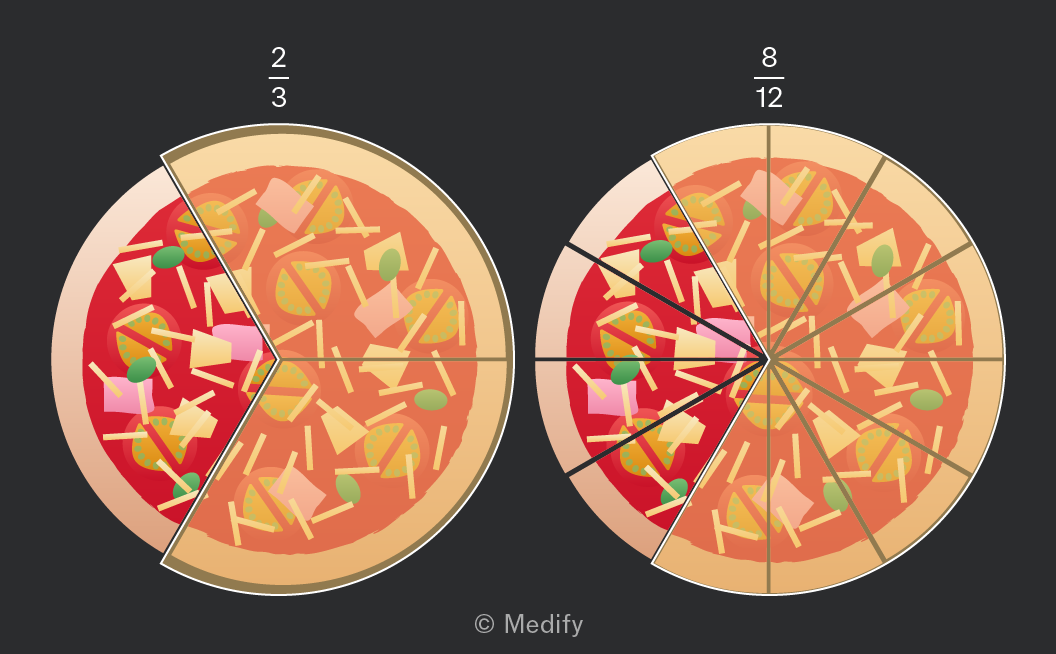
Fractions are equivalent if they represent the same quantity.

For example, and are equivalent to each other.
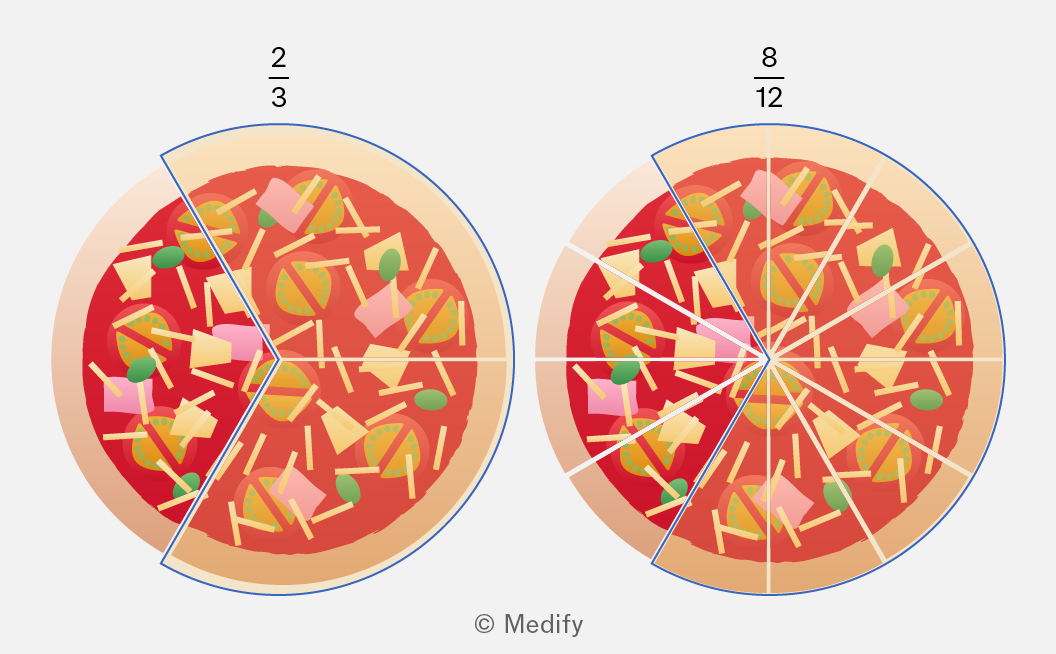
The image shows two pizzas with different fractions of slices highlighted. The pizza on the left is divided into three slices with two out of three slices highlighted, labeled with the fraction 2/3 above it. The pizza on the right is divided into twelve slices with eight out of twelve slices highlighted, labeled with the fraction 8/12 above it. Both pizzas have toppings including cheese, green olives, and pieces of ham and vegetables. The background contains the text '© Medify' at the bottom.

You can convert any fraction to another, equivalent fraction, by multiplying or dividing both the numerator and denominator by the same number.

This is useful when simplifying fractions to an equivalent fraction that uses smaller numbers.

For example:

Add to favourites

If two fractions have the same denominator, you can add or subtract them by adding or subtracting their numerators.

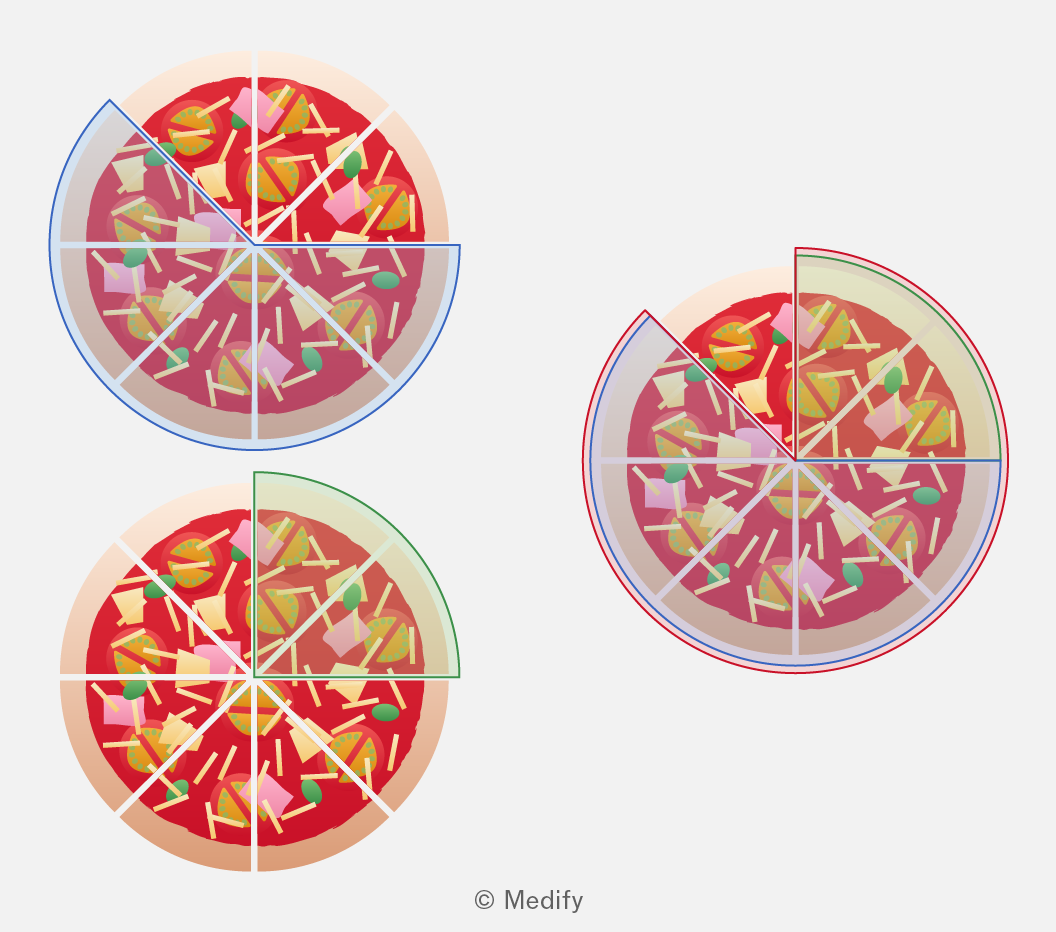
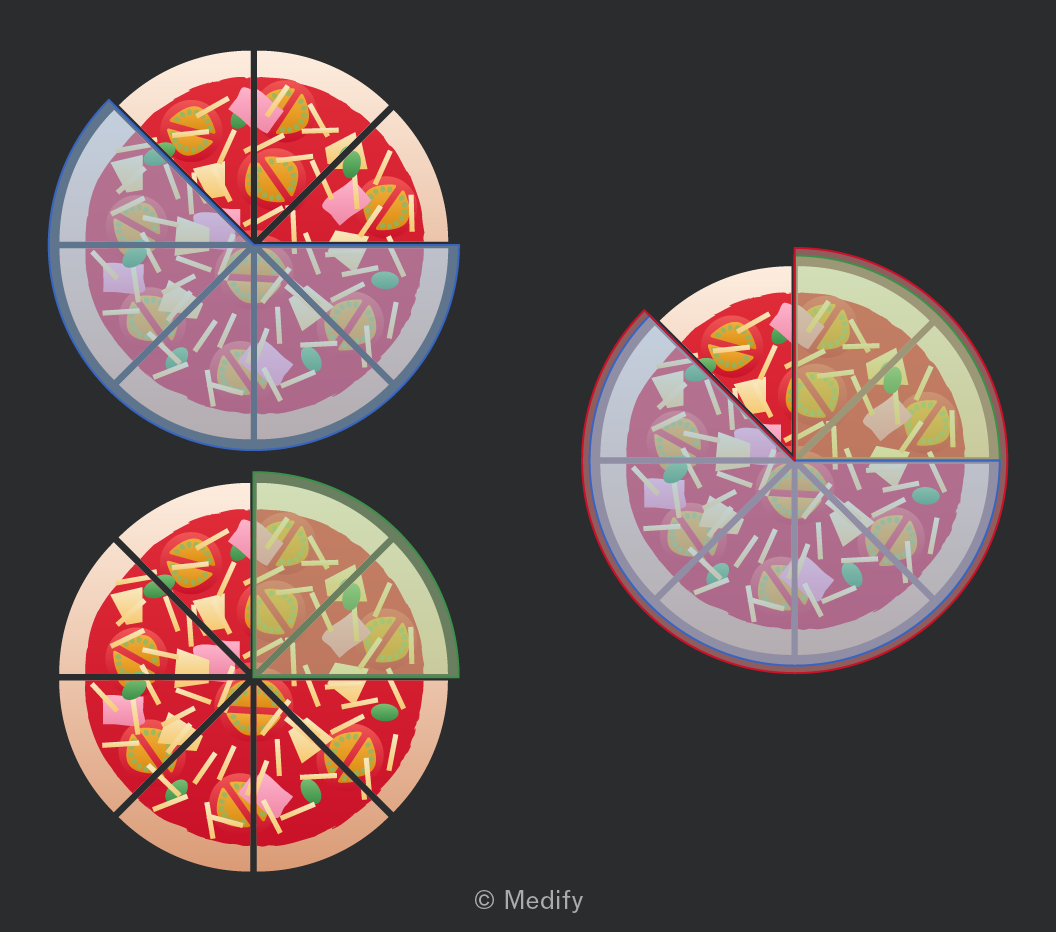
For example,

The image shows three pizzas divided into different sections. The top-left pizza is divided into six equal slices with a blue outline on the left half. The bottom-left pizza is similarly divided into six equal slices, with a green outline around the top-left quarter section. The right-side pizza is also divided into six equal slices, with a red outline around the top-right quarter section. Each pizza has toppings such as tomatoes, cheese, and herbs. The sections are visually distinct with varying outlines.

If you need to add or subtract fractions with different denominators, you must first convert them into equivalent fractions with the same denominator.

For example:

Add to favourites

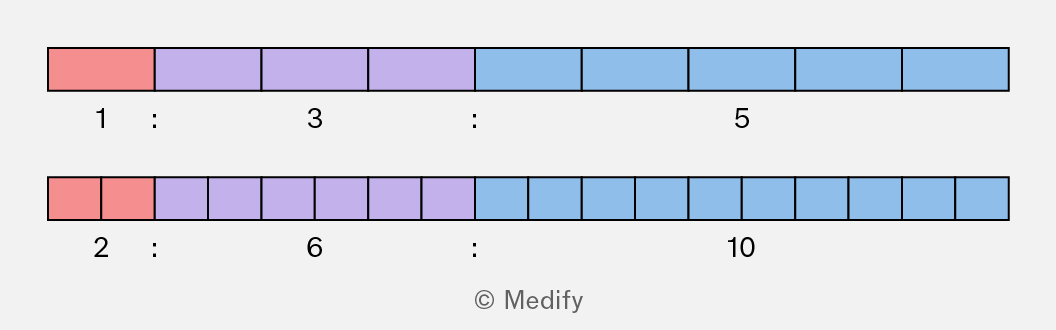
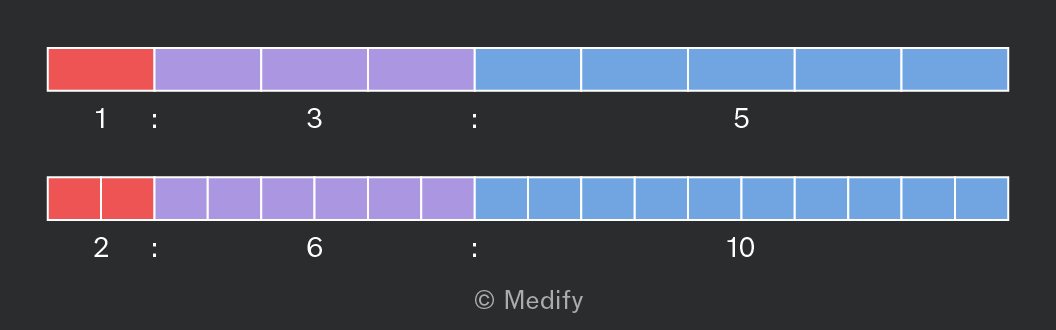
Ratios are equivalent if they represent the same proportion.

For example, and are equivalent to each other.
The image displays two horizontal bar sections, each divided into colored segments. The top section consists of three colored segments: one red segment, followed by two purple segments, and three blue segments. Below this, the labels '1 : 3 : 5' are placed in alignment with the segments. The bottom section mirrors the color sequence with two red segments, followed by four purple segments, and five blue segments. Below it, the labels '2 : 6 : 10' are aligned with the segments. The image is marked with '© Medify' at the bottom.

You can convert any ratio to another, equivalent fraction, by multiplying or dividing each part by the same number.

This is useful when simplifying ratios to an equivalent ratio that uses smaller numbers.

For example:

Add to favourites

Question walkthrough

Create ratios from various information

Converts mixed time units into a simplified ratio in part (a), then builds a ratio from relative statements (‘twice as long as’, ‘half as long as’) using an arbitrary starting value in part (b).

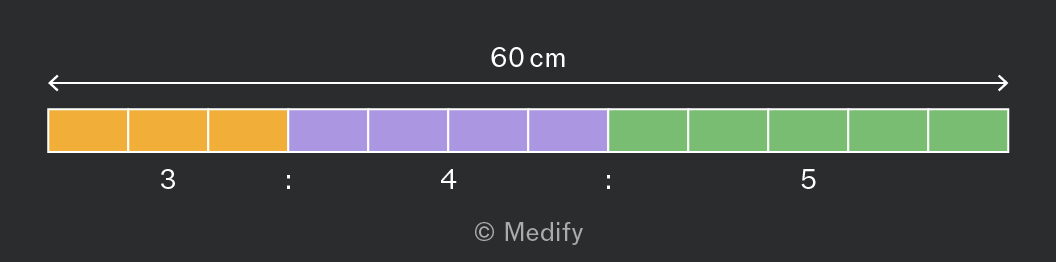
You can use a ratio to divide a quantity into parts.

For example, to divide into three parts in the ratio
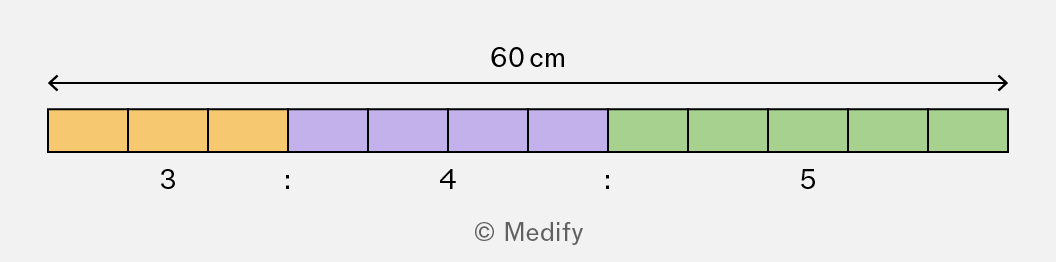
A horizontal bar divided into sections. The entire length is labeled as 60 cm with arrows indicating the measurement. The bar is partitioned into three colored sections from left to right: orange, purple, and green. Each section contains four smaller squares. Below the bar are the numbers 3, 4, and 5, separated by colons, aligning with the orange, purple, and green sections, respectively. The copyright is marked as © Medify.

To do this:

1) Determine the number of parts:

2) Use this to find the size of one part by dividing the total amount by the number of parts:

3) Multiply each part of the ratio by this size:

Add to favourites

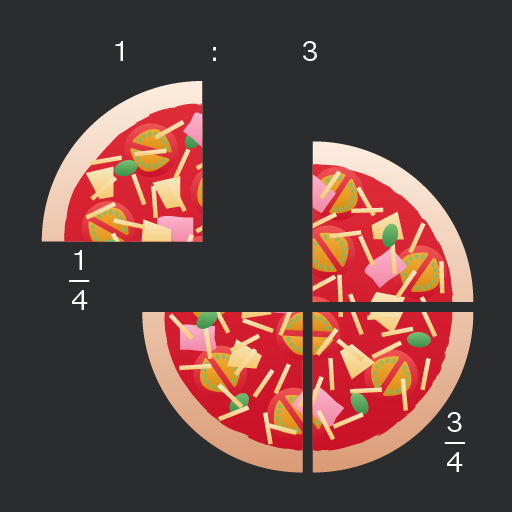
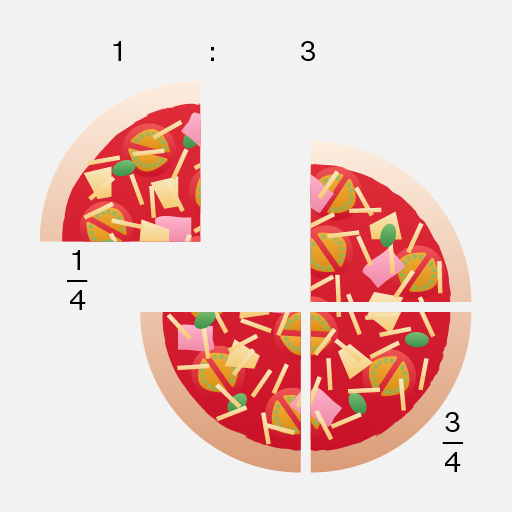
Ratios are often presented in the form for some value of

In these cases, be aware that there are parts in total.

The 1 represents of the whole, not
The image shows a pizza divided into two sections: one smaller quarter section on the left and a larger three-quarter section on the right. Above the sections is the ratio '1 : 3'. The quarter section on the left has the fraction '1/4' next to it, and the three-quarter section on the right has the fraction '3/4' next to it. The pizza is topped with various ingredients like cheese, tomato slices, and green leaves.
Do

Add all the parts of the ratio when dividing.

In this case, the ratio is so there are 4 parts. So of the pizza is on the plate.

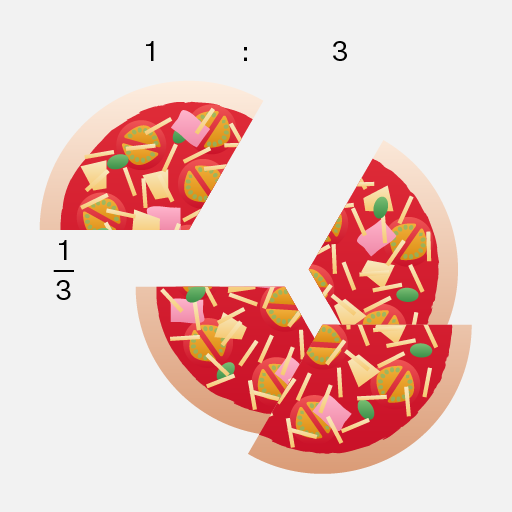
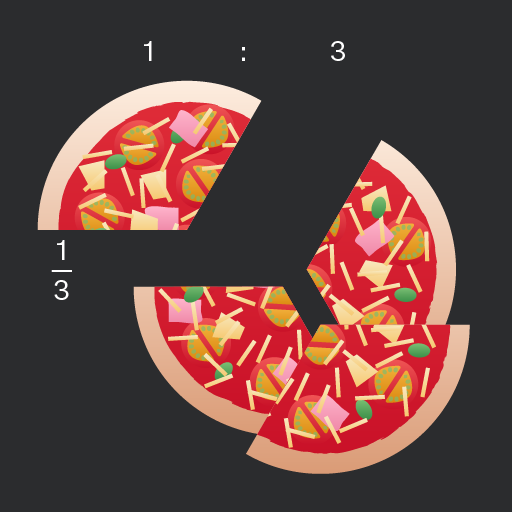
A visual representation of a pizza separated into two unequal parts. The larger piece represents three-quarters of the pizza, while the smaller piece represents one-quarter. The smaller piece is annotated with the fraction '1/3'. Above the pizza, there is a ratio notation '1 : 3', indicating the size relationship between the smaller and larger pieces. The pizza is topped with various ingredients such as pepperoni, cheese, and vegetables.
Don't

Confuse and as these are not the same.

In this case, the ratio is so the pizza should be divided into quarters, not into thirds!

Add to favourites

Question walkthrough

Use ratios to divide quantities

Uses the ratio 3:5:2 to find the red paint needed given a known blue paint volume, then finds the blue paint needed for a 3-litre batch of the mixture.

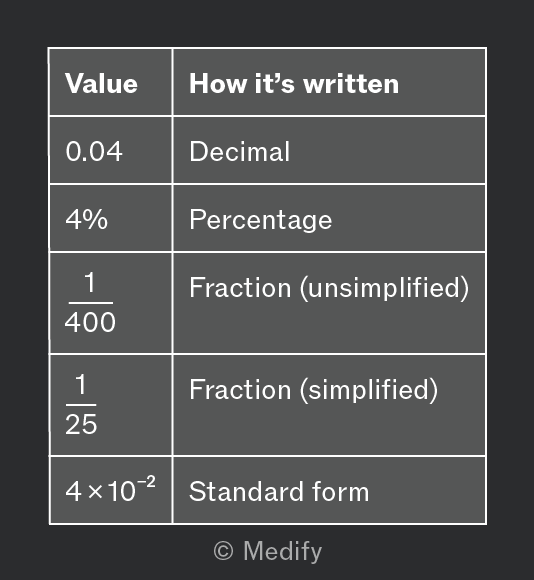
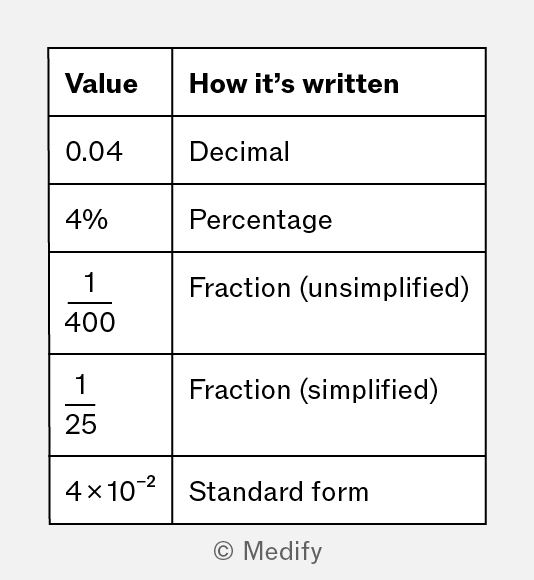
Numbers can be expressed in various forms, each suited for different contexts and calculations. Understanding these representations is crucial for effective mathematical communication and problem-solving.

For example, all of the following describe the same number:
A table with two columns labeled 'Value' and 'How it’s written'. Rows display: 1. '0.04' as 'Decimal'. 2. '4%' as 'Percentage'. 3. '1/400' as 'Fraction (unsimplified)'. 4. '1/25' as 'Fraction (simplified)'. 5. '4 × 10^(-2)' as 'Standard form'.

You need to understand numbers written in any of these ways, and how to convert numbers to decimals, percentages, and standard form.

The way you write the number may depend on:

  • what form related numbers were provided to you in,
  • what you are trying to do with these numbers’ and
  • how the question might ask you to present your answer.
Add to favourites

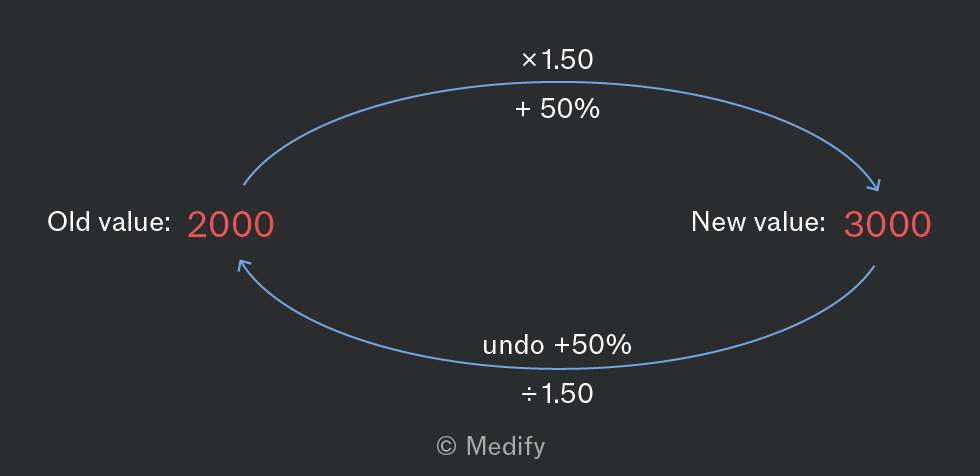
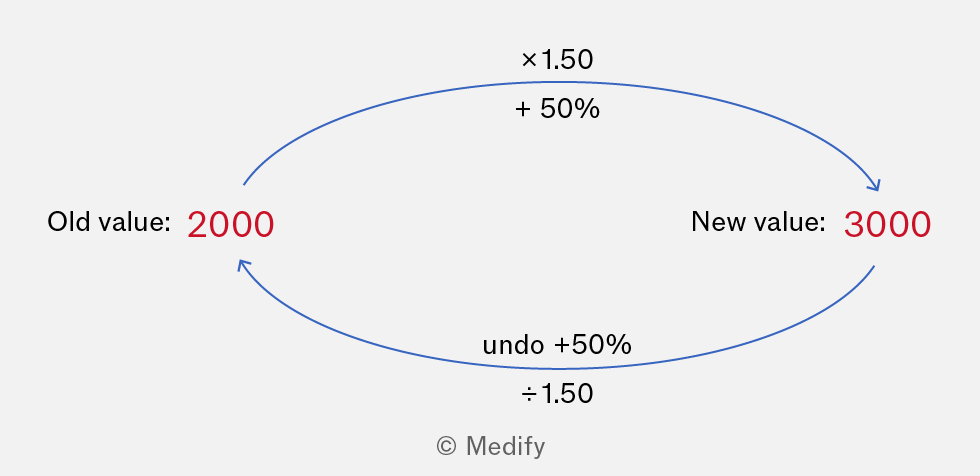
The simplest way to solve most calculations involving percentage change is to convert the percentage to a multiplier.

You can find the multiplier by applying the percentage change to the number 1.

For example:

  • An increase of has a multiplier of 1.50.
  • A decrease of has a multiplier of 0.50.
A diagram showing a conversion process between two values. On the left, 'Old value: 2000' is labeled in red. On the right, 'New value: 3000' is labeled in red. An arrow pointing from the old value to the new value is labeled '×1.50' and '+50%'. Another arrow pointing from the new value back to the old value is labeled 'undo +50%' and '÷1.50'.

To increase 2000 by multiply

If an unknown value has been increased by to 3000, find the old, unknown value by dividing by the multiplier:

Add to favourites

Be careful when finding the old value before a percentage change.

For example, suppose that in the past month, the number of bees in a hive increased by and is now 440 bees. What was the previous value?

Although the old value is clearly smaller than 440, you must use the multiplier for a percentage increase (1.1) and divide by that to find the old value.

Do

Divide by the correct multiplier when finding the old value before a percentage change.

Don't

Use a multiplier for a percentage decrease if the scenario is a percentage increase.

Multiply by the multiplier when finding the old value.

Add to favourites

Question walkthrough

Calculate quantities using percentage change.

Uses percentage multipliers to find one farmer’s harvest from another’s known percentage increase and a third’s from a percentage decrease, then sums all three totals.

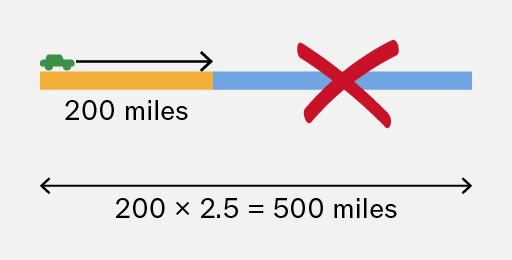
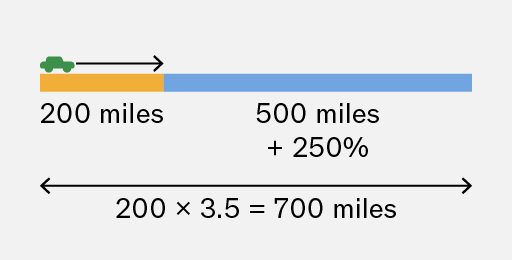
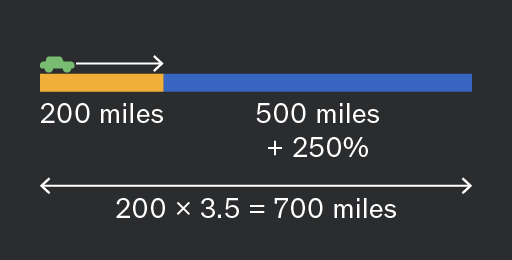
A percentage change tells you the amount to add or subtract from the original amount. It is different to the percentage of a number.

For example, suppose an electrical vehicle can travel for 200 miles on a single charge, but a newer model can travel further. How far can the new model travel?
The image shows a visual representation of a journey. A car icon points to the right towards a horizontal bar divided into two segments. The first segment is orange and labeled '200 miles'. The second segment is blue, labeled '500 miles' and '+ 250%'. Below the bar, an annotation reads '200 x 3.5 = 700 miles' with arrows pointing in both directions. The arrows and labels suggest a proportional increase in distance from 200 miles to 700 miles, represented by the two segments on the bar.
Do

Add or subtract percentage changes to the original amount.

Alternatively, use the correct multiplier:

The image shows a schematic illustrating a travel distance concept. A small green car is positioned at the beginning of an orange bar labeled '200 miles'. An arrow extends from the car to the end of the orange bar, indicating a travel distance of 200 miles. Beyond the orange bar, a blue bar extends further to the right, with a large red 'X' over it, suggesting a restriction or prohibition. Below the bars, an equation '200 x 2.5 = 500 miles' is displayed, with arrows on either side pointing outward, implying a comparison or extension of distance.
Don't

Confuse percentage change with percentage of.

of 200 is 500 miles, but this is the amount to add. It is not the final answer!

Alternatively, the multiplier should be 3.5 (not 2.5).

Add to favourites

Many diagrams illustrate things that are much larger or smaller than the paper or screen. These are scale drawings, and they use a ratio to describe how distances on the diagram relate to distances in reality.

For example:

  • Maps
  • Photos of tissues and microorganisms (in Biology)
  • Diagrams of large or small machines
Map of High Bircham area labeled with roads and landmarks. Key locations include: 'High Bircham' centrally, 'Five Ways' intersection, 'Upper Road', 'Lower Road', 'The Street', and 'Long Lane'. Landmarks include 'Mill Ponds' in the northwest, 'Loggers Woods' in the northeast, 'Free Copse' in the west, and 'The Estate' in the south. Two 'PH' symbols are marked, one in the northwest and another in the southeast. A railway line runs horizontally across the top. A river flows along the bottom. The scale shows '0 100 m' with '1 cm: 100 m' at the bottom right.

According to the scale on this map, a distance of on the map represents on the ground.

Add to favourites

Assessing whether your calculated answer for a quantity is reasonable using your scientific understanding or general knowledge can be very useful.

For example, suppose you are estimating how much petrol a car will need for the journey to a beach about 80 miles away. You know that a typical car travels about 40 miles per litre of fuel. However, you incorrectly multiply these quantities, rather than divide them:


A man with a beard wearing a brown hoodie, green pants, and a red cap is filling a blue car with fuel at a gas station. A sign next to him indicates '2 litres'.
Do

Check whether the answer is reasonable.

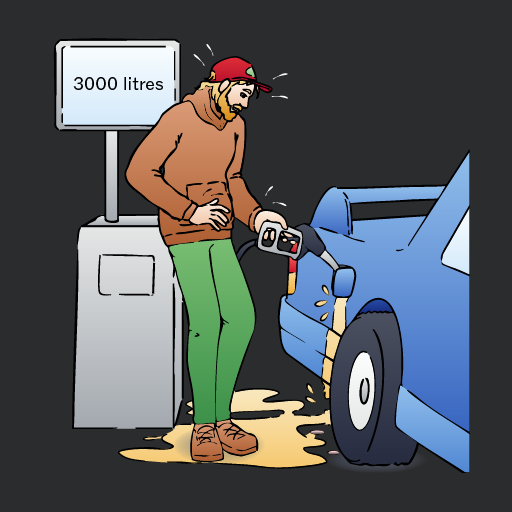
3200 litres would be larger than the entire car, and would cost thousands of pounds!

If your answer is not reasonable, try to find the error.

(The correct amount is 2 litres.)

A man in a brown hoodie and red cap is standing at a gas pump, looking distressed as fuel spills onto the ground from the nozzle he is holding, while a sign in the background indicates '3000 litres'.
Don't

Accept unreasonable answers without checking.

Add to favourites

When you don’t need a precise result from a calculation, you can do a quick estimate. This is useful for checking whether your answer is reasonable and faster than using a calculator.

There are many good ways to estimate.

You can round each value to one significant figure or to another number that you consider convenient.

For example:

The exact answer is confirming that the estimate was quite accurate.

Add to favourites

When estimating, you should round each value to a number that is both:

  • close (so the estimate will be accurate enough)
  • easy for arithmetic (so you can easily complete the calculation)

Do

Round all values to a number that is close to the original number and easy for arithmetic.

Don't

Round any value to a number that is too far from the original. is not close to , and is not close to .

Round any value to a number that is difficult for you to use in arithmetic. is not easy to calculate!

Add to favourites

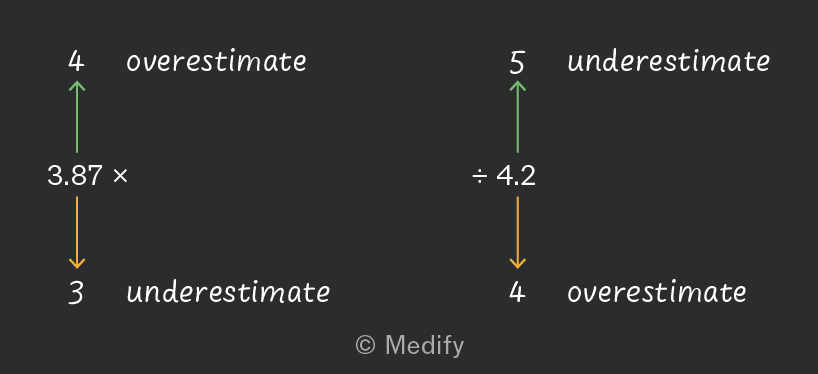
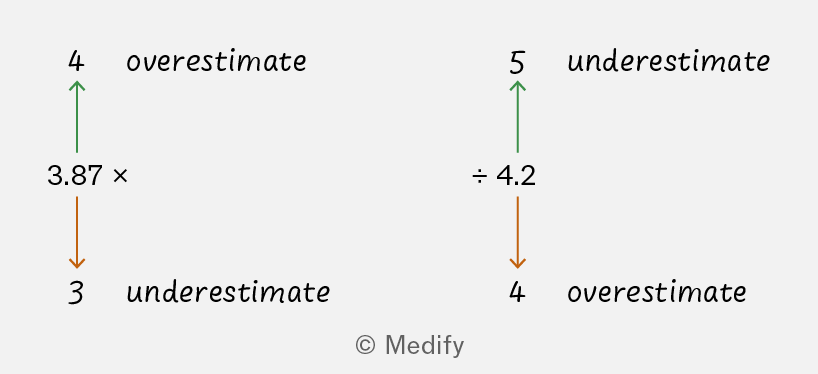
When estimating a multiplication, determine if the estimate is likely to be an overestimate or an underestimate:

  • Rounding either value up causes an overestimate.
  • Rounding either value down causes an underestimate, for the same reason.

For example, estimating gives an overestimate, because the correct answer is

When estimating a division, the opposite is true for the denominator: rounding up results in an underestimate, and rounding down causes an overestimate.

For example, estimating gives an overestimate, because the correct answer is
A diagram illustrating the concepts of overestimation and underestimation with numerical values. On the left side, the number 4 is labeled as 'overestimate' with an upward arrow pointing to 3.87 multiplied, and the number 3 is labeled as 'underestimate' with a downward arrow. On the right side, the number 5 is labeled as 'underestimate' with an upward arrow pointing to 4.2 divided, and the number 4 is labeled as 'overestimate' with a downward arrow.

Note most estimation requires rounding multiple values. Depending on which values are rounded up or down, the result could be a clear overestimate, a clear underestimate, or unclear.

Add to favourites

Question walkthrough

Estimate a result, and determine whether it’s an underestimate or overestimate

Estimate results with easier arithmetic.

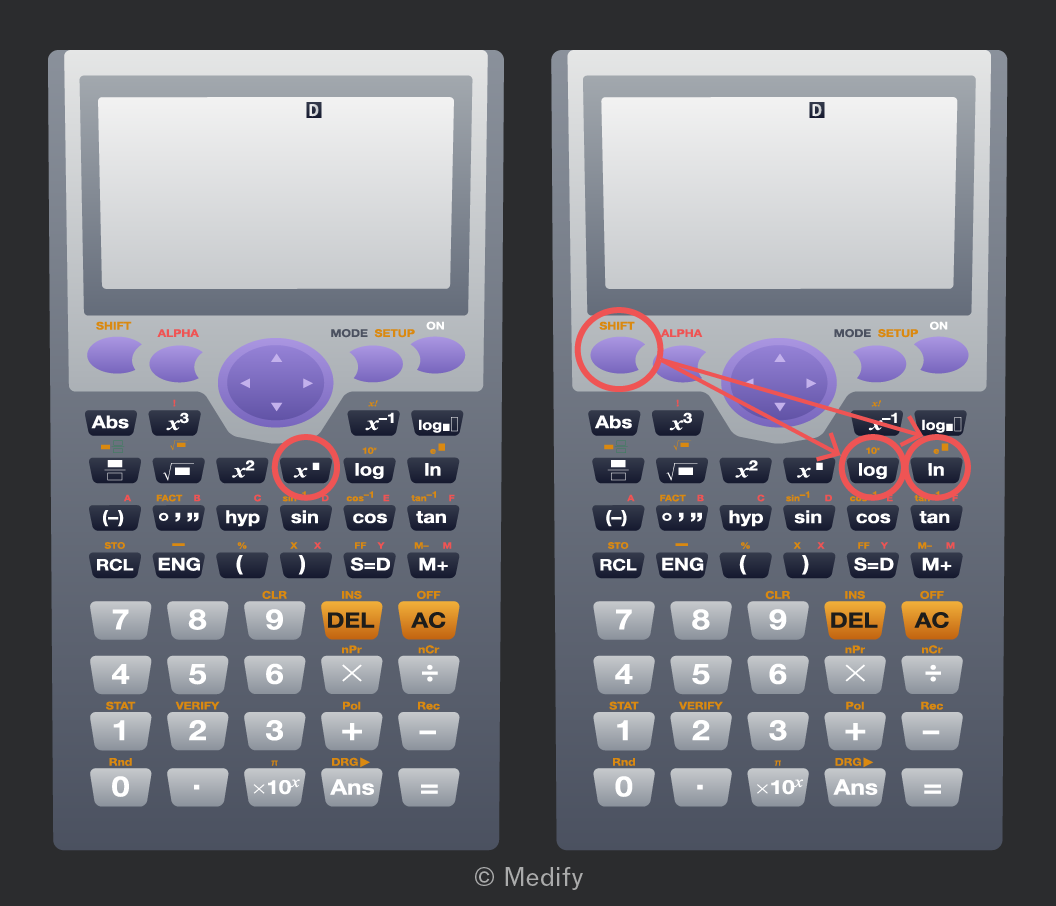
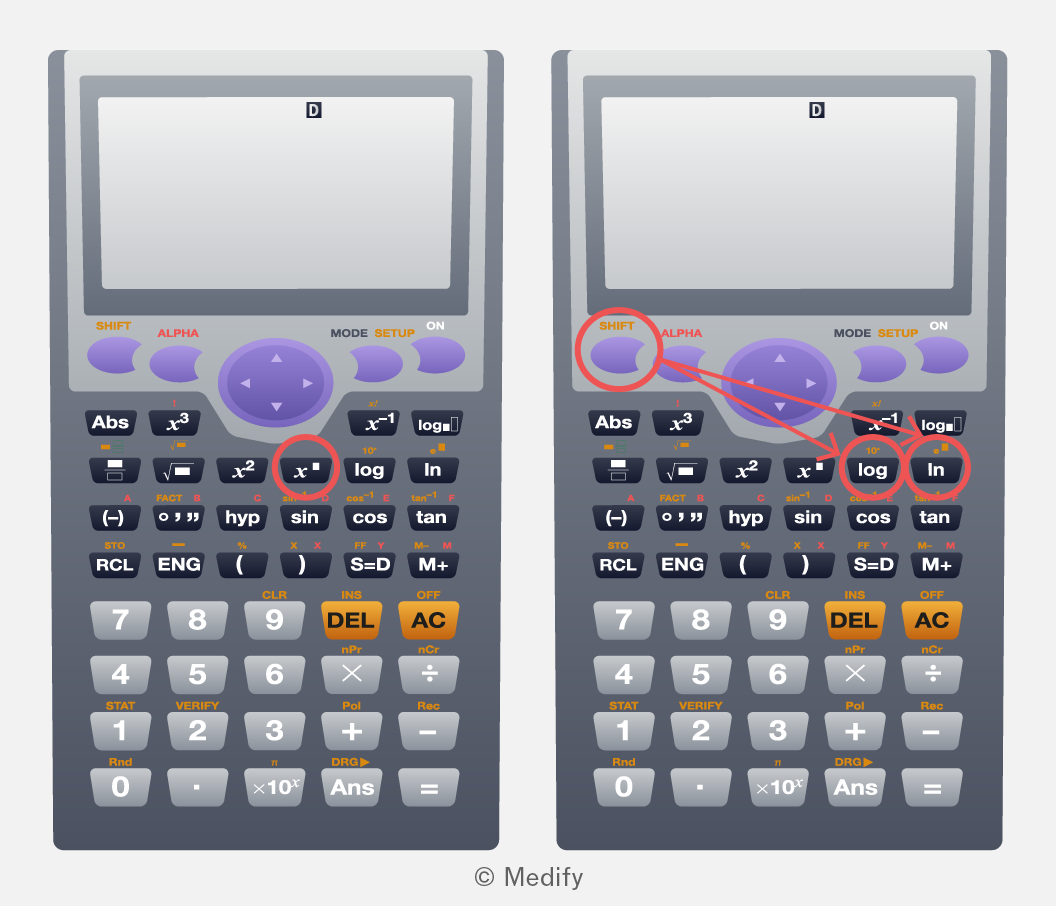
Your scientific calculator has buttons to calculate for any value of and

You should familiarise yourself with these buttons, so you can use them easily in your exams.

For example, a Casio calculator has the following:

  • for arbitrary and
  • for powers of 10.
  • for the exponential function (powers of
The image shows two scientific calculators side by side. Both calculators display 'D' on their screens. The left calculator has a red circle around the 'x^' button. The right calculator has a red circle around the 'SHIFT' button and arrows pointing to the 'log' button and 'ln' button, both also circled in red. The calculators have various buttons labeled with mathematical functions and numbers, including 'Abs', 'x^3', 'x^2', 'log', 'ln', 'sin', 'cos', 'tan', 'DEL', 'AC', 'RCL', 'ENG', and numeric digits from 0 to 9.

Try calculating on your calculator. On the display above, this would be using SHIFT, log, 3 and =. Your calculator may be different. The result should be 1000.

Try calculating on your calculator. On the display above, this would be using 7, 4 and =. Your calculator may be different. The result should be 2401.

Add to favourites

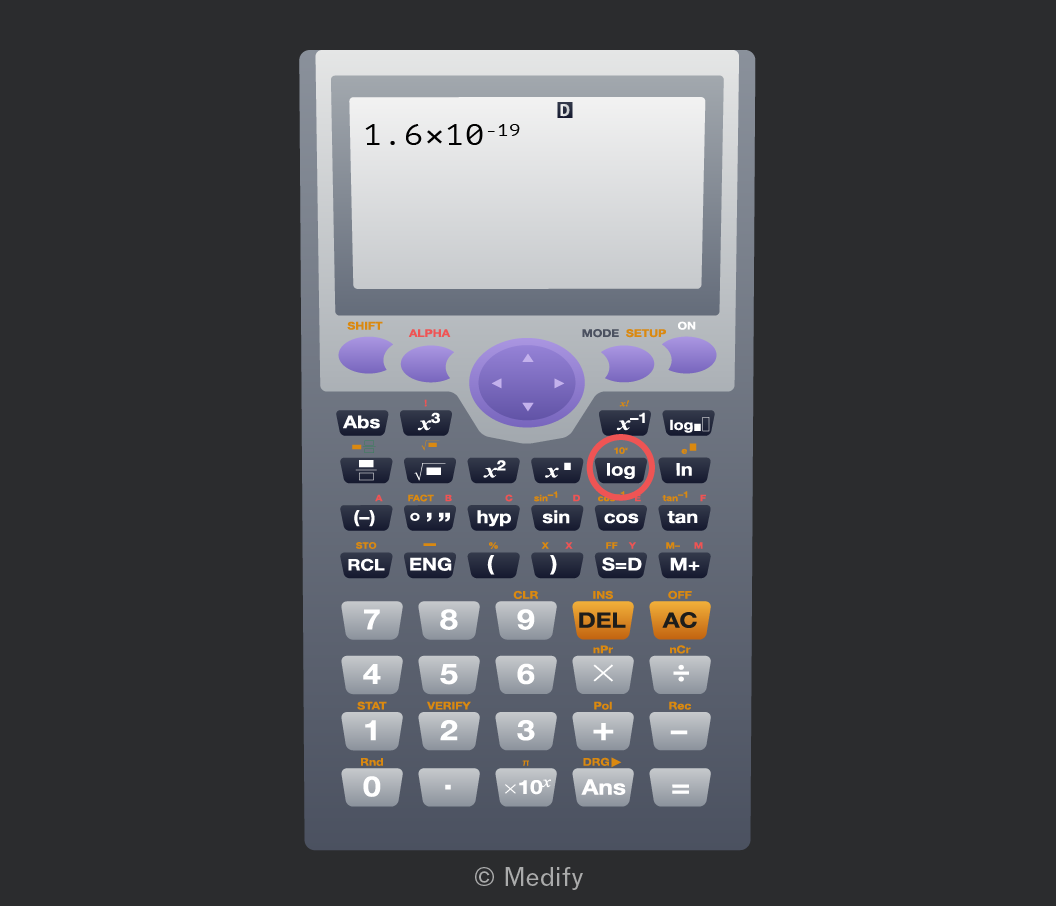
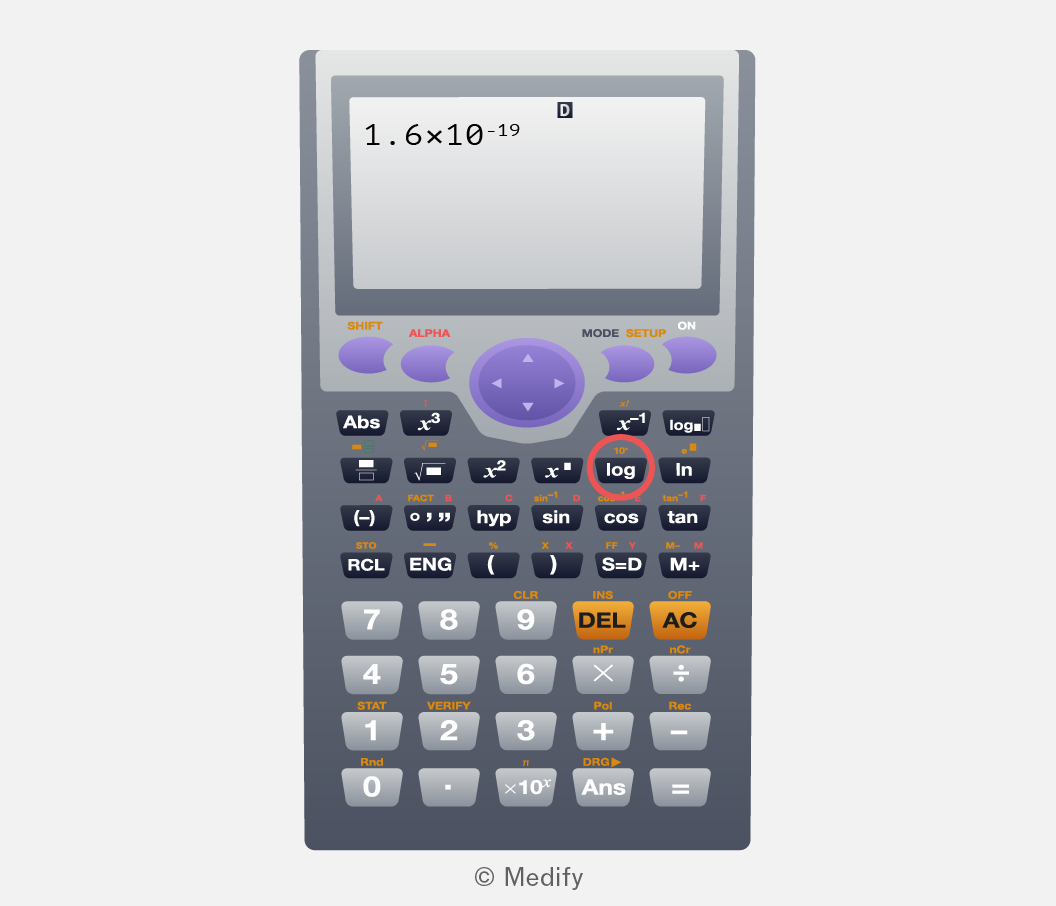
You can use the exponent buttons on your scientific calculator to type numbers in standard form. You should familiarise yourself with how to do this, for the calculator that you will use in your exams.

For example, on a Casio calculator, you can use the button.
The image shows a scientific calculator with a display screen at the top. The screen displays '1.6×10^-19'. Below the screen, there are several rows of buttons with various functions. The top row includes buttons for 'SHIFT', 'ALPHA', 'MODE', 'SETUP', and 'ON'. There are buttons for mathematical functions such as 'Abs', 'x^3', 'x^2', 'x^-1', 'log', 'ln', 'sin', 'cos', and 'tan'. Numerical buttons range from 0 to 9, with additional buttons for operations like 'DEL', 'AC', 'RCL', 'ENG', and 'Ans'. The 'log' button is circled in red. The calculator has a purple directional pad in the middle. The logo '© Medify' is at the bottom.

Try calculating on your calculator. On the display above, this would be using 4, – and 3. The result should be 0.004.

Add to favourites

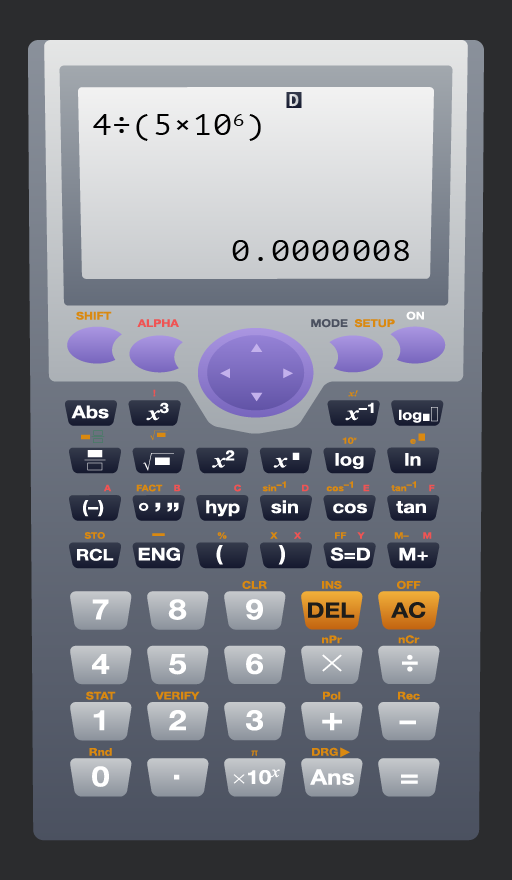
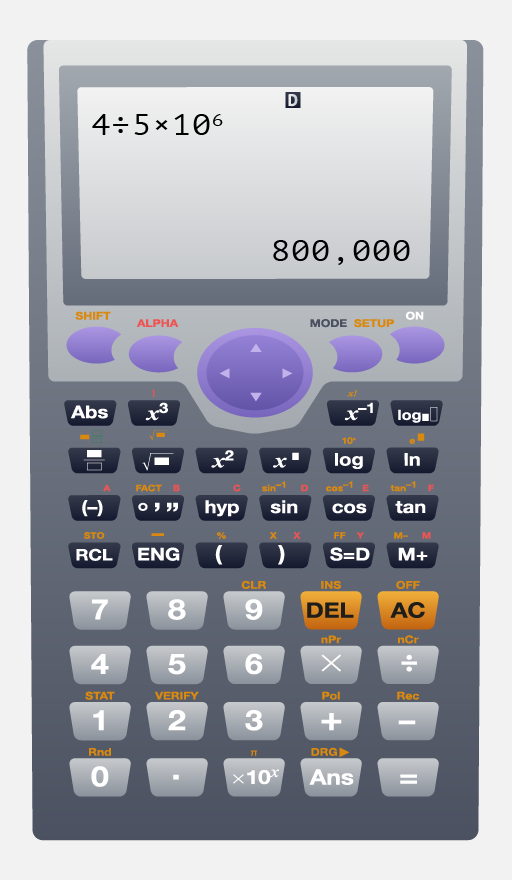
One common mistake when using a scientific calculator is when dividing by numbers in standard form. You must use brackets to enforce the correct order of operations.

For example, consider the expression This is not the same as
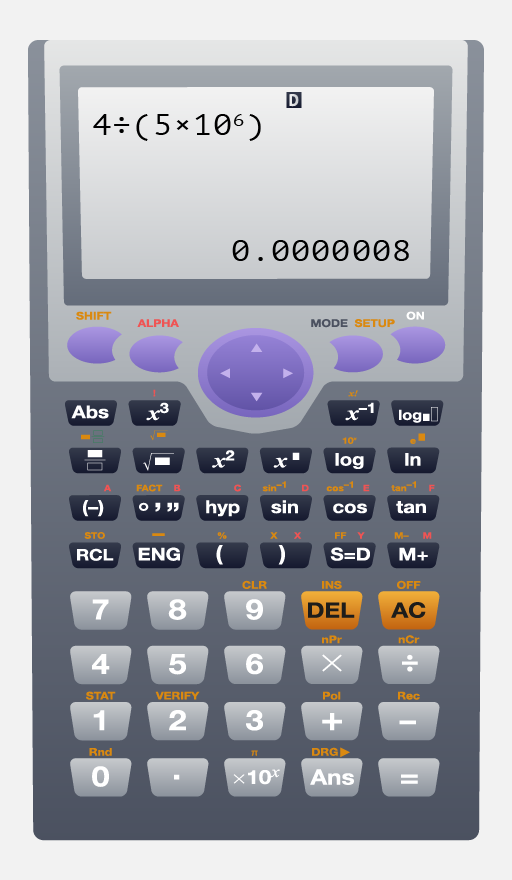
Image of a scientific calculator displaying a calculation. The screen shows '4 ÷ (5 × 10^6)' with the result '0.0000008'. The calculator has various buttons including numerical keys 0 to 9, a decimal point, and operation keys such as '÷', '×', and '-'. Function keys include 'sin', 'cos', 'tan', 'log', 'ln', 'x^3', 'x^2', '√', and '10^x'. There are also mode keys such as 'SHIFT', 'ALPHA', 'MODE', and 'SETUP'.
Do

Use brackets to enforce the correct order of operations when dividing by numbers in standard form.

(Alternatively, use the fraction function on your calculator and put the number you are dividing by in the denominator.)

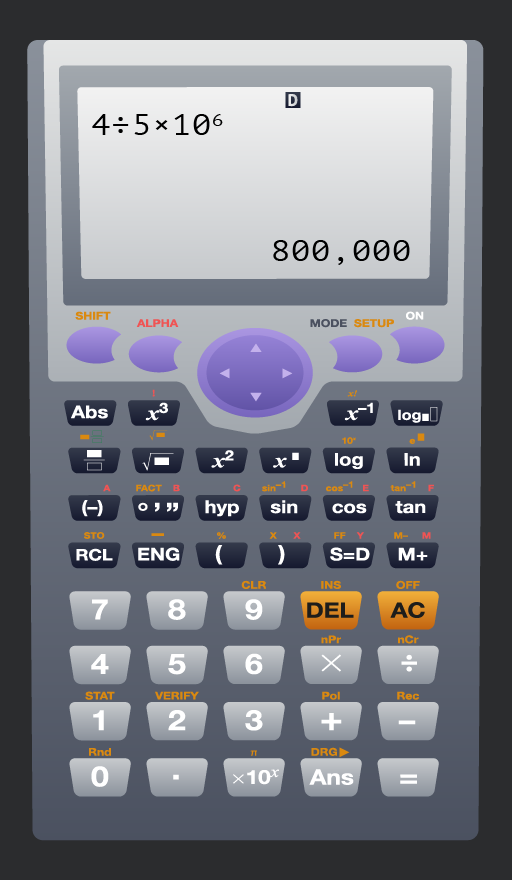
A calculator display showing the equation '4 ÷ 5 × 10^6' with the result '800,000'. The calculator has various buttons including: 'Abs', 'x^3', 'x^2', 'log', 'ln', 'sin', 'cos', 'tan', '7', '8', '9', 'DEL', 'AC', '4', '5', '6', '1', '2', '3', '0', 'Ans', and others. Special function buttons include 'SHIFT', 'ALPHA', and 'MODE'.
Don't

Use the division symbol without brackets when dividing by a number in standard form.

(You should use your knowledge of science to check whether your answer is reasonable.)

Add to favourites

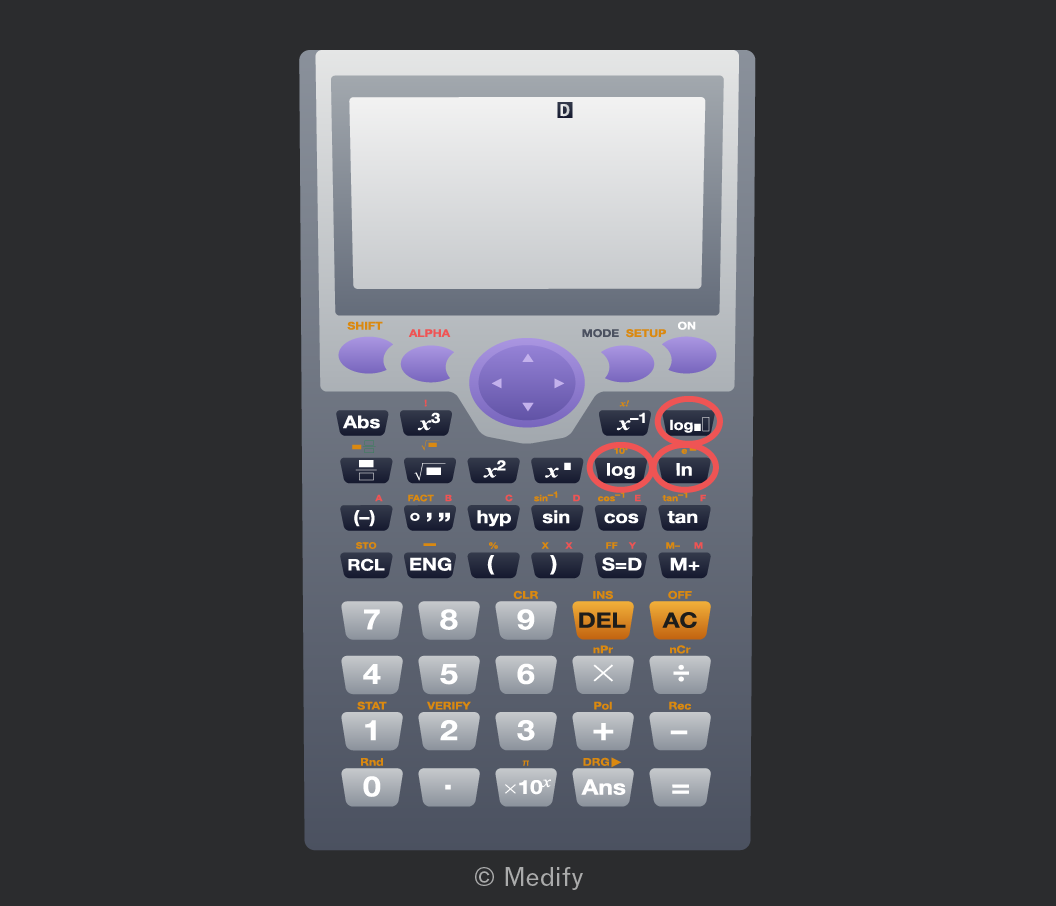
Your scientific calculator has buttons to calculate logarithms to any base.

You should familiarise yourself with these buttons, so you can use them easily in your exams.

For example, a Casio calculator has the following:

  • for logarithms to base 10.
  • for natural logarithms, which are to base
  • for logarithms to any base that you specify.
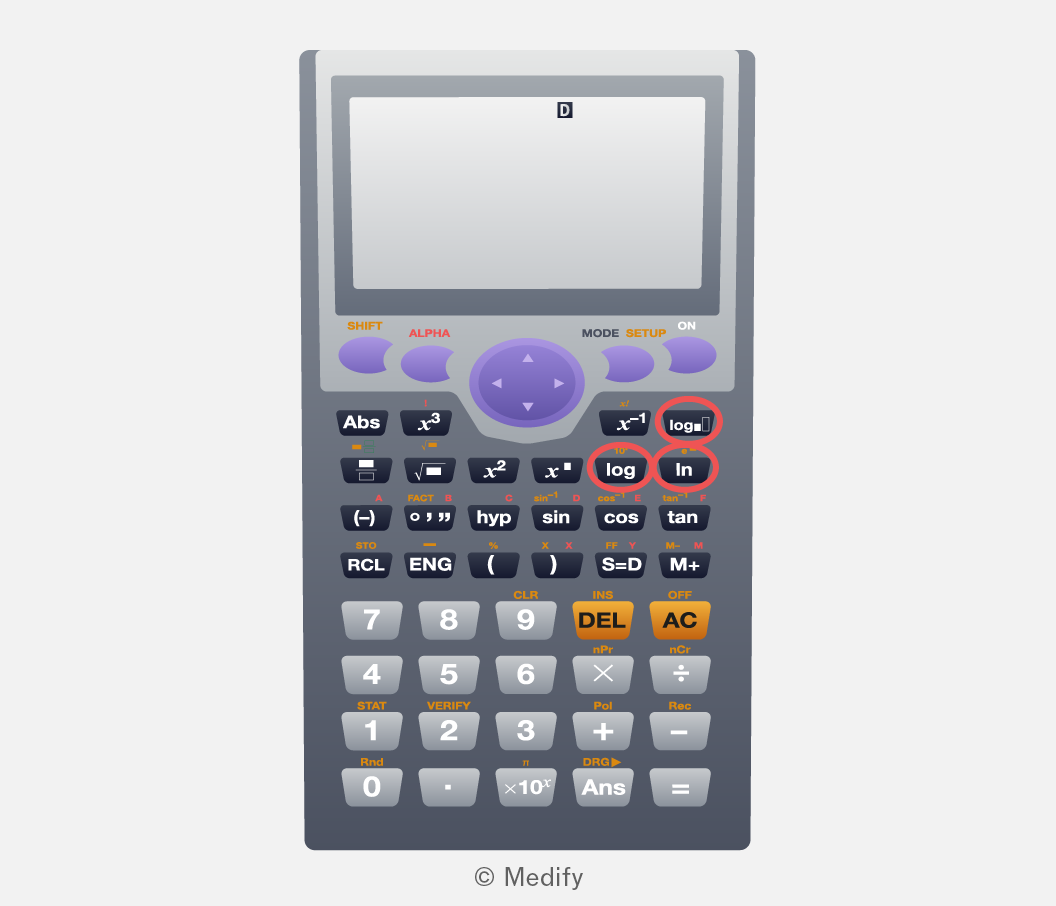
Image of a scientific calculator with a large display screen showing the letter 'D'. The calculator features various buttons: 'SHIFT' and 'ALPHA' in orange, 'MODE' and 'SETUP' in green, and standard numeric keys (0-9). Function keys include 'Abs', 'x^3', 'x^2', 'x^−1', 'log', 'ln', 'sin', 'cos', 'tan', and others. There are also keys for mathematical operations and functions like 'DEL', 'AC', 'hyp', and 'ENG'. Some keys have dual functions indicated by secondary labels, highlighted in different colors. The calculator has directional navigation buttons in the center. Below the display, there are circular buttons marked with arrows for navigation.

Try calculating on your calculator. On the display above, this would be using 1000 and =. Your calculator may be different. The result should be 3.

Try calculating on your calculator. On the display above, this would be using 2, right arrow, 128 and =. Your calculator may be different. The result should be 7.

Add to favourites

Students commonly make errors when typing expressions into their calculator.

You should check whether your answer is reasonable to make sure that you haven’t made such an error. If your answer looks unreasonable, you have the opportunity to correct your calculation.

The following might help you notice an unreasonable answer:

  • Based on your scientific knowledge (or general knowledge), is the result the order of magnitude that you would expect?
  • Should your result be a whole number or a decimal?
  • Are there other equivalent values in the question that your result should be similar to?
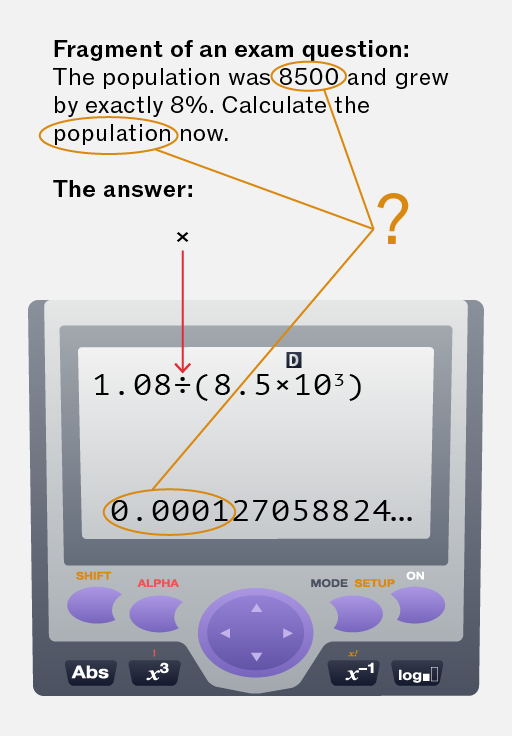
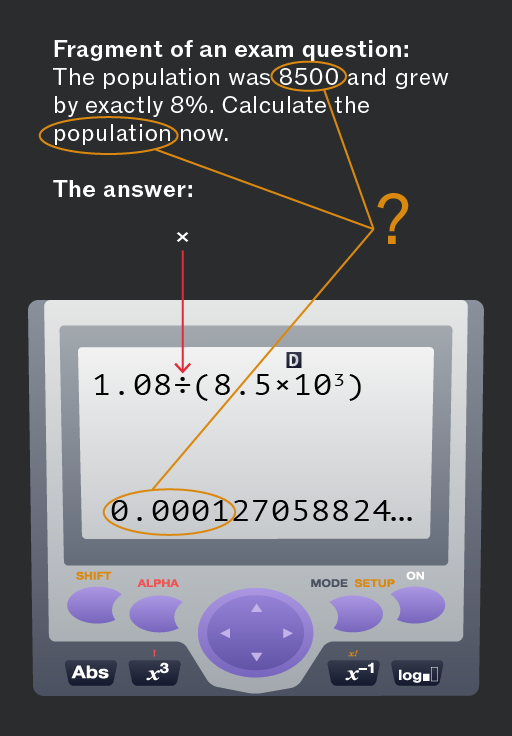
The image shows a fragment of an exam question and a calculator display. The question states: 'Fragment of an exam question: The population was 8500 and grew by exactly 8%. Calculate the population now.' The number '8500' and the word 'population' are circled. The text 'The answer:' is followed by an arrow pointing to a calculator screen. The screen displays '1.08 ÷ (8.5 × 10³)' with a result of '0.000127058824...'. A question mark is connected to the result, indicating a potential error or query.
Do

Check whether your answer is reasonable before writing it down.

In the example above, the population should be a whole number close to 8500. The calculation should be:

And the result is 9180.

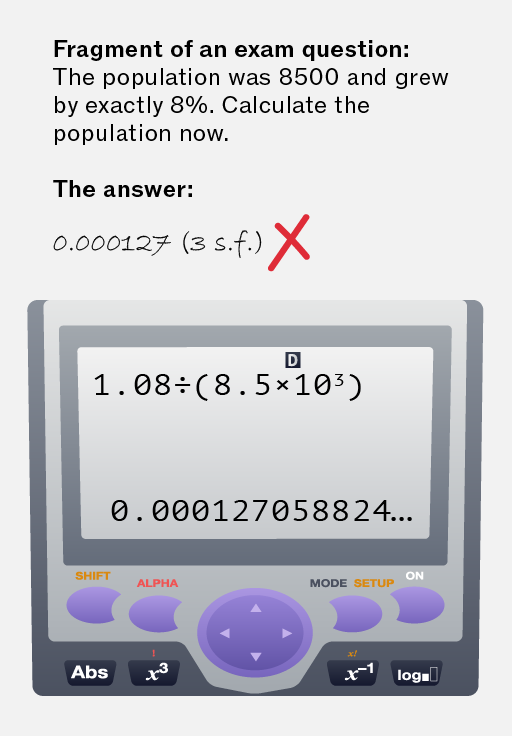
The image shows a fragment of an exam question: 'The population was 8500 and grew by exactly 8%. Calculate the population now.' Below this, it reads 'The answer:' followed by '0.000127 (3 s.f.)' with a red cross next to it, indicating the answer is incorrect. Below this is an image of a calculator display showing: '1.08 ÷ (8.5 × 10³)' and the result '0.000127058824...'. The calculator has buttons labeled: 'SHIFT', 'ALPHA', 'MODE', 'SETUP', 'ON', 'Abs', 'x³', 'x⁻¹', 'log'.
Don't

Write down an unreasonable result without checking for the mistake.

In the example above, the population should be a whole number close to 8500.

Add to favourites

You can find the values of sin, cos, or tan using your scientific calculator, by pressing the buttons with those names.

However, these functions can be used in both degrees and in radians. Your calculator will have a setting to change between degrees mode and radian mode. You must use the correct mode. Otherwise, your answers will be incorrect!

For example, on a Casio calculator, press + and find the setting to change the angle unit. A small ‘D’ or ‘R’ will persist on the display so you can immediately check the mode.
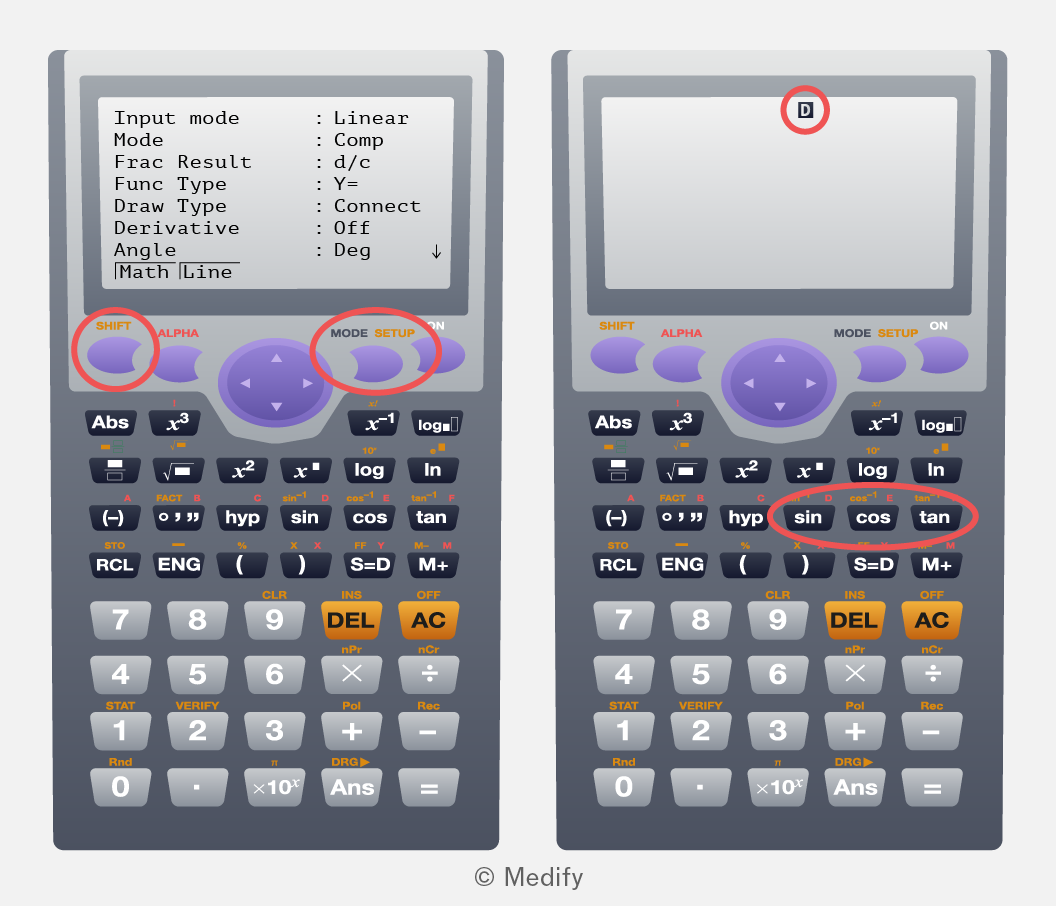
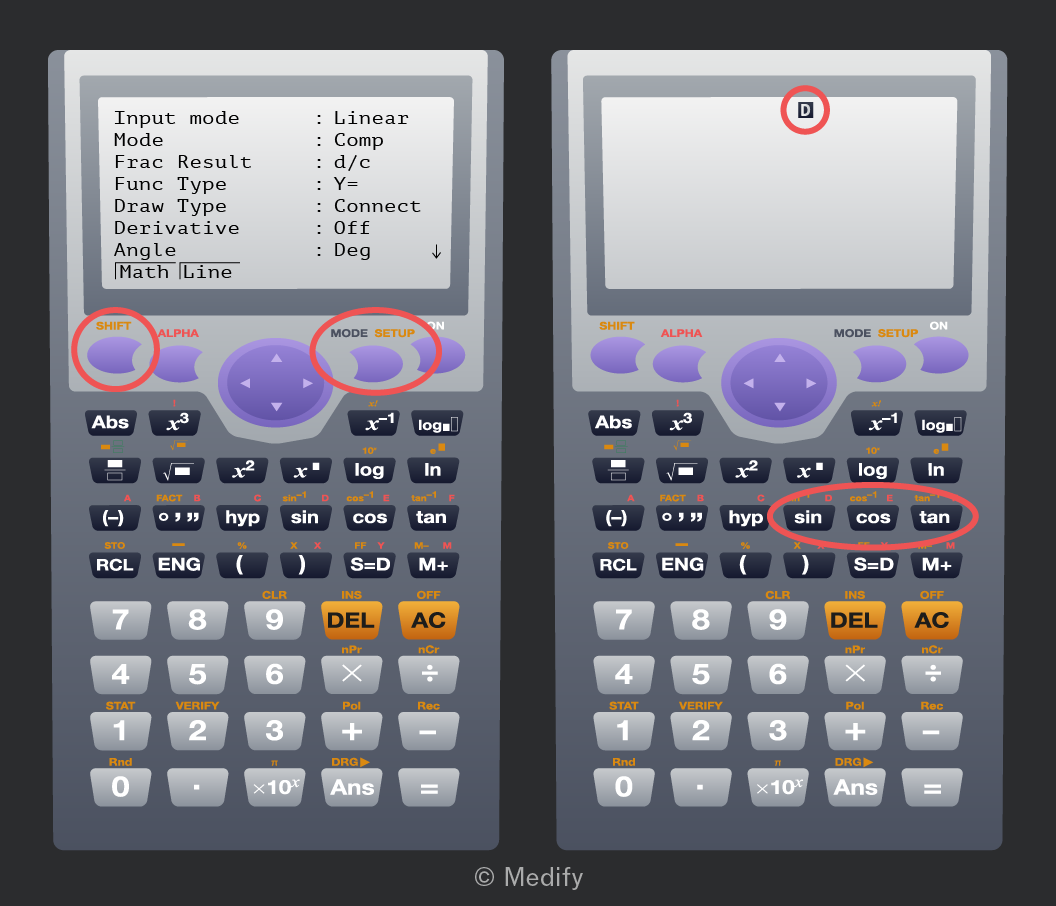
Image of two scientific calculators side by side. The left calculator displays a screen showing settings: 'Input mode: Linear', 'Mode: Comp', 'Frac Result: d/c', 'Func Type: Y=', 'Draw Type: Connect', 'Derivative: Off', 'Angle: Deg', 'Math Line'. Below the screen are buttons with labels including 'SHIFT', 'ALPHA', 'MODE SETUP', and a directional pad. Other visible buttons include mathematical functions like 'Abs', 'x^3', 'log', 'sin', 'cos', 'tan', and numbers '0' to '9'. The right calculator has an empty screen with a 'D' symbol at the top. It has similar buttons to the left calculator, with 'sin', 'cos', 'tan' buttons circled in red.

If you need help checking the mode your calculator is in or learning how to change modes, refer to online instructions for guidance. Alternatively, you can ask your teachers or your peers.

Try calculating on your calculator. If the answer is exactly , you are in degrees mode. If the answer is about , you are in radians mode.

Add to favourites

Your scientific calculator supports the inverse trigonometric functions and (also known as arcsin, arccos and arctan).

Check how to find these functions on your calculator.

For example, on a Casio calculator, press + tan, and ‘’ will appear on the calculator display, ready to use.
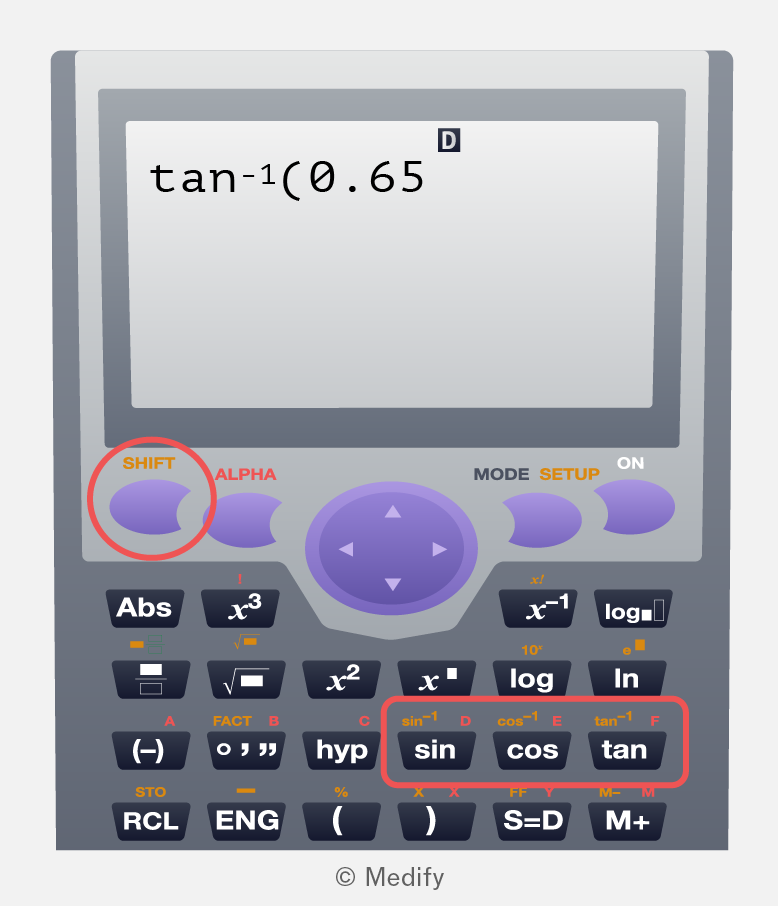
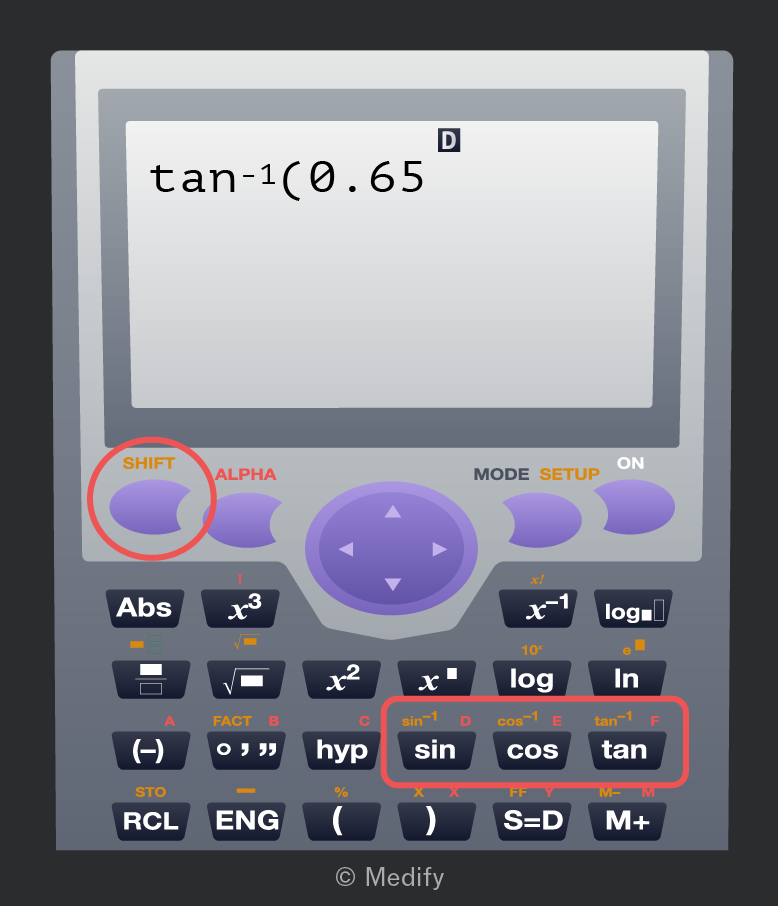
Image of a calculator screen displaying 'tan^-1(0.65)'. The calculator has various buttons with labels: 'SHIFT', 'ALPHA', 'MODE', 'SETUP', 'ON', 'Abs', 'x^3', 'x^2', 'x^-1', 'log', 'ln', 'hyp', 'sin', 'cos', 'tan', '(', ')'. The 'SHIFT' and 'tan' buttons are highlighted with a red circle. A directional pad is in the center of the calculator.

Remember to use the correct mode to specify whether your answer will be in degrees or radians.

If you need help using the inverse trigonometric functions, check online for instructions. Alternatively, you can ask your teachers or your peers.

Try calculating on your calculator in degrees mode. The answer should be

Add to favourites

Sometimes your calculator will display an error rather than a numerical answer. There are two main types of error:

  • Syntax error: This appears if you made an error when typing the expression. You should fix what you typed.

For example, try using your calculator to find “” – which is not a complete expression. This should result in a syntax error.

  • Math error: This occurs when a calculation yields no answer, for instance, when dividing by zero. You can interpret this mathematically as an equation having no solution.

For example, try using your calculator to find This should result in a math error, because the maximum value for sine is 1, so 8 is not a valid input.
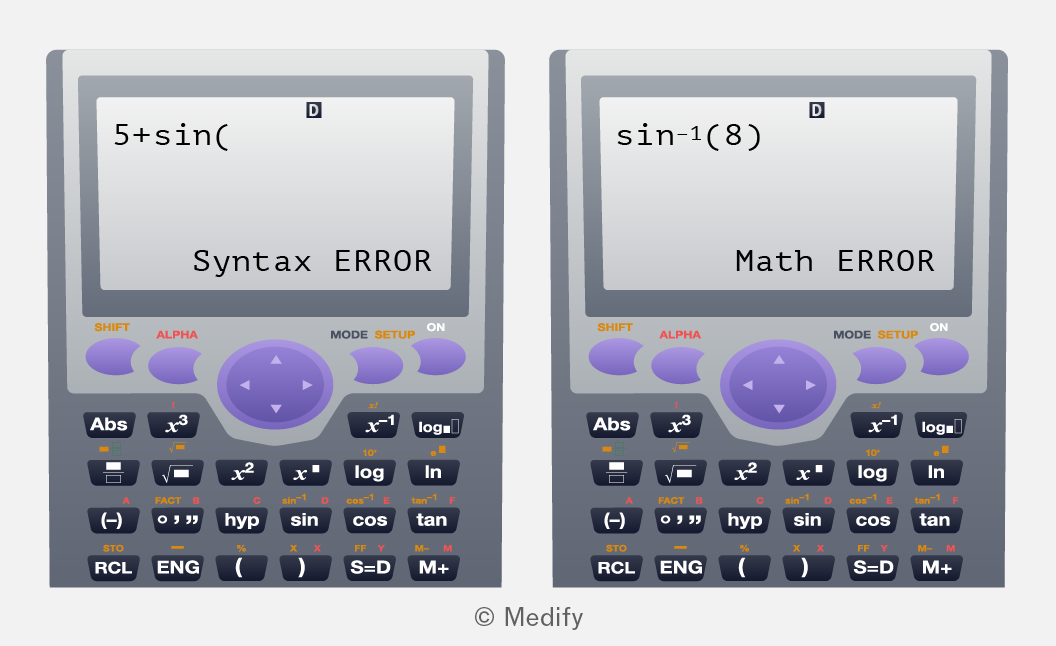
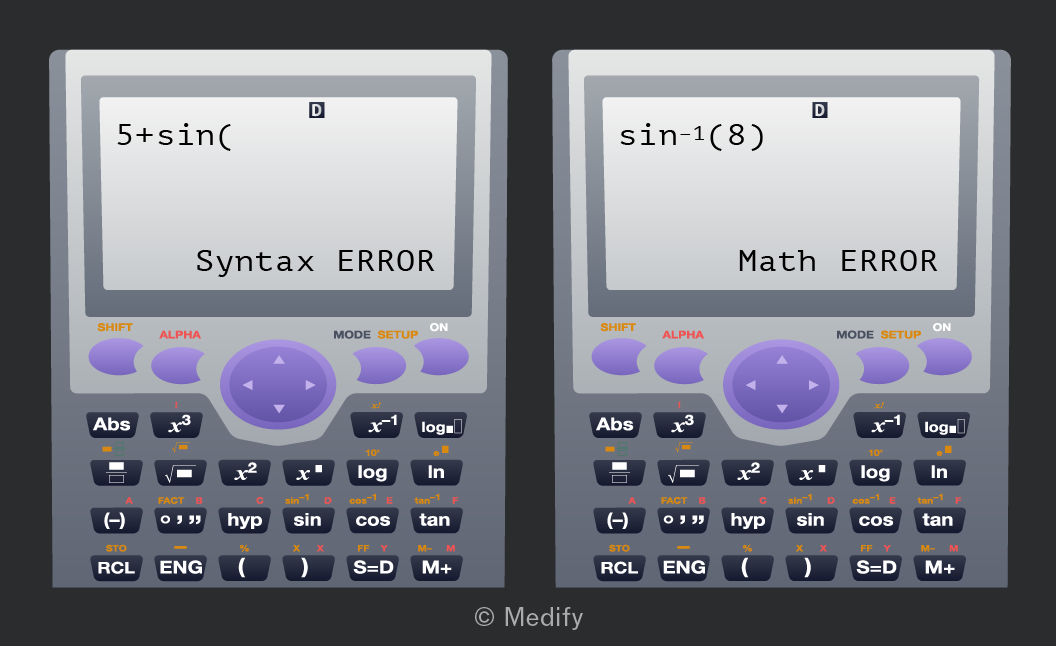
The image shows two calculators side by side. The left calculator screen displays '5+sin(' followed by 'Syntax ERROR'. The right calculator screen displays 'sin^-1(8)' followed by 'Math ERROR'. Both calculators have various buttons including 'SHIFT', 'ALPHA', 'MODE', 'SETUP', 'ON', and standard mathematical functions such as 'Abs', 'x^3', 'log', 'ln', 'sin', 'cos', and 'tan'.
Add to favourites

Choosing the right calculator can make a big difference in your A-levels. Most science students aspiring to medical school also take A-level maths. For these students, a graphic calculator may be a worthwhile investment across multiple subjects, despite its higher cost.

The fx-CG50 from Casio, and its newer model, the fx-CG100, are the most advanced graphic calculators approved for UK A-level exams.

  • Best for students seeking to deepen their understanding of concepts, work through complex problems, and explore topics such as vectors and 3D graphing.

The FX-991CW is Casio’s top-tier non-graphic scientific calculator, approved for all major A-level exams.

  • Ideal for students who don’t need graphing functions, prefer a familiar layout from GCSE, or want a more affordable yet capable calculator for A-level science and maths.

Disclaimer: Medify Ltd is not affiliated with CASIO or its subsidiaries. References to CASIO products are for educational purposes under fair use.

Add to favourites